
The best smart displays for seniors can make everyday routines easier while helping family members stay connected. This roundup compares voice assistants, digital calendars, reminder boards, clocks, and photo frames for different needs and living situations.
Look beyond screen size and price: accessibility, reminder controls, video calling, setup requirements, and ongoing app support can make the biggest difference in daily use.
Best 10 Smart Displays for Seniors Picks for 2026
Compact Alexa Hub

- Compact 5.5-inch display
- Video calls and camera viewing
- Privacy shutter and smart-home control
Best For: Small-space Alexa access and everyday calls
Family Photo Connection
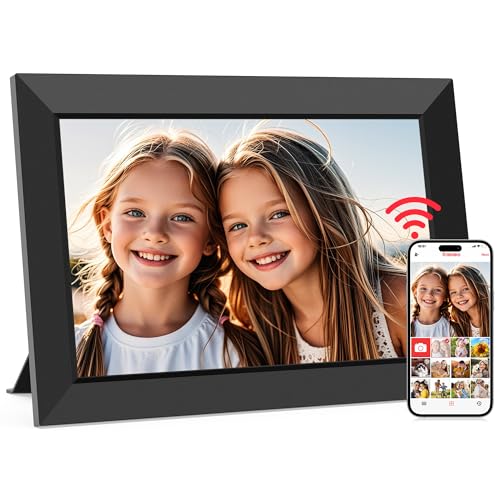
- Large IPS touchscreen
- Remote photo and video sharing
- 32GB storage with calendar features
Best For: Grandparents who want simple family photo updates
Large Alexa Assistant

- 8.7-inch HD touchscreen
- Auto-framing video calls
- Smart-home hub and spatial audio
Best For: Full-featured household assistance and larger-screen viewing
Family Schedule Organizer
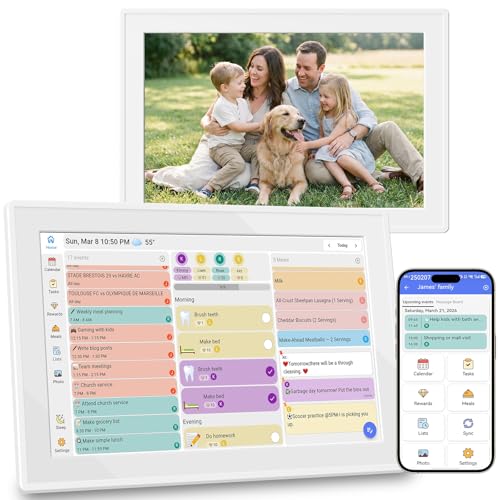
- Syncs major calendar platforms
- Tasks, meals, and grocery lists
- No subscription and wall-mountable
Best For: Shared schedules and household planning
Best Overall

- 15.6-inch Full HD screen with customizable family widgets
- Video calling, Fire TV, photos, and smart-home controls
- Built-in camera shutter and mic/camera-off privacy controls
Best For: Seniors who want organization, communication, entertainment, and smart-home control in one display
Best Family Planner
Eyoyo 15.6-Inch Digital Calendar

- Large Full HD touchscreen for shared schedules
- Subscription-free sync with reminders and loud alerts
- Auto-dimming plus wall or desk installation options
Best For: Families and caregivers managing appointments, medication reminders, and household routines
Best Simple Reminder Clock
YUYIALARM 10.1-Inch Wi-Fi Display

- Large, readable display for time, date, weather, and temperature
- 64 customizable alarms for medications and appointments
- Auto-dimming and Wi-Fi time synchronization
Best For: Seniors who need clear daily orientation information and recurring reminders
Best for Family Video Calls

- Auto-answer video calling for hands-free use
- Remote photo, video, reminder, and weather updates
- 15.6-inch display with private family connections
Best For: Seniors who want simple family communication and shared photos
Best No-Subscription Reminder Board
Memoryboard Digital Reminder Board

- No interaction required from the senior
- Remote reminders, messages, appointments, and photos
- High-contrast display with no required subscription
Best For: Caregivers supporting routines, reminders, and family check-ins
Best for Large Time-and-Date Display

- Large 10.1-inch day, date, and time display
- Voice time reporting in nine languages
- Multiple alarms with automatic day/night dimming
Best For: Seniors needing readable time and schedule reminders
Compact Alexa Hub – Echo Show 5
For shoppers comparing smart displays for seniors, the Echo Show 5 is a compact option for checking weather and news, making video calls, viewing compatible cameras, and controlling compatible smart-home devices. Its 5.5-inch screen fits easily on a bedside table or kitchen counter.
Best For: Seniors who want a small Alexa display for calls, reminders, entertainment, and basic home control.
Pros:
- Compact 5.5-inch display shows news, weather, song titles, and more at a glance.
- Supports video calls, announcements, compatible camera viewing, and Drop In.
- Deeper bass and clearer vocals support music, podcasts, and streaming entertainment.
- Includes a camera shutter and mic/camera controls for added privacy.
Cons:
- The small screen may be less comfortable for viewing videos or detailed information.
- Video calling requires contacts with the Alexa app or a compatible Echo device with a screen.
The Echo Show 5 is a practical choice when limited space matters most. Buyers who prefer a larger display for calendars, recipes, or easier viewing may want to consider a bigger model.
Family Photo Connection – Frameo 10.1-inch WiFi Frame
Among smart displays for seniors, the Frameo 10.1-inch WiFi frame focuses on simple family connection rather than voice assistance. Relatives can send photos and short videos through the app, while the recipient can browse memories on the touchscreen.
Best For: Seniors who primarily want an easy digital photo frame that keeps family photos and videos arriving remotely.
Pros:
- 10.1-inch 1280×800 IPS touchscreen is designed for easy viewing from different angles.
- Invited family and friends can send photos and videos through the Frameo app.
- 32GB storage holds over 80,000 photos, with microSD support for transfers and backups.
- Includes calendar syncing, albums, collage mode, weather, and sleep settings.
Cons:
- App-uploaded videos are limited to 15 seconds; longer videos require microSD transfer.
- It is primarily a photo and organizer display, not a general voice assistant or video-calling device.
This Frameo model is a strong gift-oriented choice for keeping loved ones visually connected. Its touch controls and large screen suit photo sharing, though shoppers seeking broader smart-home features should look elsewhere.
Large Alexa Assistant – Echo Show 8
The Echo Show 8 is a versatile pick among smart displays for seniors, combining an 8.7-inch HD touchscreen with video calling, entertainment, recipes, calendars, and smart-home control. Its larger viewing area can be easier to use than a compact display.
Best For: Seniors who want a full-featured Alexa display for calls, household planning, entertainment, and compatible smart-home devices.
Pros:
- Vibrant 8.7-inch HD display provides 15% more viewing area than the 2023 Echo Show 8.
- Centered auto-framing camera, 3.3x zoom, and noise reduction support video calls.
- Built-in smart-home hub controls compatible lights, thermostats, cameras, and more.
- Spatial audio, clearer vocals, and up to twice the bass support music and streaming.
Cons:
- Its broader feature set may be more than needed for someone seeking only photo display or simple reminders.
- Video calls depend on compatible Alexa contacts or services.
The Echo Show 8 offers the best balance here for shoppers who want a larger screen without giving up Alexa functionality. It is especially useful in shared spaces where calendars, recipes, calls, and entertainment are viewed regularly.
Family Schedule Organizer – 10.1-inch Digital Calendar
This 10.1-inch digital calendar takes a different approach to smart displays for seniors by centering on schedules, reminders, and household organization. It syncs Google Calendar, iCloud, and Outlook, while also showing chores, meal plans, grocery lists, weather, and family photos.
Best For: Seniors and families who need a shared visual calendar with reminders, tasks, meal planning, and photo-display functions.
Pros:
- Syncs Google Calendar, iCloud, and Outlook in real time without a subscription.
- Combines schedules, chores, meal plans, grocery lists, and to-do items on one screen.
- Wall-mountable design includes reminders, local weather, slideshow mode, and smart sleep.
- Phone-based management lets families assign chores and monitor progress remotely.
Cons:
- Its feature set is focused on organization rather than video calling or voice-controlled entertainment.
- The supplied notes do not specify the display resolution or supported calendar account limits.
This organizer is a useful option when the main goal is keeping appointments and household plans visible. It suits families coordinating with an older relative, but it is less appropriate if the priority is Alexa, streaming, or direct video calls.
Best Overall – Amazon Echo Show 15
The Amazon Echo Show 15 is a versatile choice among smart displays for seniors, especially for households that want reminders, family communication, entertainment, and smart-home controls in one large screen. Its 15.6-inch Full HD display and customizable widgets make key information easy to see at a glance.
Best For: Seniors and families who want a large household organization hub with video calling, entertainment, and voice-controlled smart-home features.
Pros:
- Large 15.6-inch Full HD display with customizable calendars, to-do lists, weather, and other widgets
- Centered auto-framing camera, wide field of view, 3.3x zoom, and noise reduction for video calls
- Built-in Fire TV, included remote, photo slideshow support, and smart-home dashboard
- Camera shutter and mic/camera-off button provide convenient privacy controls
Cons:
- Its many entertainment and smart-home features may be more than some seniors need
- Some streaming services may require separate subscriptions
The Echo Show 15 is the strongest all-around pick when a senior can benefit from a visual family dashboard plus hands-free assistance. It is less focused on dedicated medication reminders than simpler senior-oriented displays, but it offers broader everyday functionality.
Best Family Planner – Eyoyo 15.6-Inch Digital Calendar
The Eyoyo Smart Family Command Center is one of the more task-focused smart displays for seniors, combining a large calendar with reminders, chore tracking, photo storage, and automatic brightness adjustment. Its subscription-free app and bold alerts can help make appointments and medication schedules more visible.
Best For: Seniors, caregivers, and families who prioritize shared schedules, medication or appointment reminders, and a wall-mounted or countertop calendar.
Pros:
- 15.6-inch 1920×1080 IPS touchscreen with a 178-degree viewing angle
- Designed for bold text and loud stereo alerts for medication reminders and appointments
- Subscription-free syncing, auto-dimming, auto-rotation, and flexible wall or desk placement
- 64GB of storage for displaying family photos when idle
Cons:
- Its primary focus is family organization rather than general entertainment or video calling
- Requires setup with Wi-Fi and the companion app
This is a practical choice for households coordinating care or keeping a senior’s daily routine visible. The large screen, auto-dimming sensor, and reminder-oriented design are particularly useful, while the photo-frame mode adds a more personal touch.
Best Simple Reminder Clock – YUYIALARM 10.1-Inch Wi-Fi Display
The YUYIALARM 10.1-inch Wi-Fi touchscreen clock is a straightforward option among smart displays for seniors who mainly need clear orientation information and recurring reminders. It shows the time, date, day, weather, and temperature in large text while supporting up to 64 customizable alarms.
Best For: Seniors, including those with memory challenges, who need an easy-to-read bedroom, living-room, or kitchen reminder display.
Pros:
- Large 10.1-inch touchscreen with bold time, date, and day information
- Up to 64 reminders for medications, appointments, vitamins, and family calls
- Wi-Fi synchronization keeps time and weather updated, including a 7-day forecast
- Auto-dimming, automatic daylight-saving adjustment, indoor temperature, and humidity readings
Cons:
- It is more of a reminder clock than a full entertainment or smart-home display
- Wi-Fi setup is needed for automatic time and weather updates
For seniors who prefer simplicity, this display keeps the focus on essential daily information and reminders rather than adding distracting extras. Its plug-in setup, multilingual support, and automatic dimming make it well suited to bedside or common-area use.
Best for Family Video Calls – ViewClix Smart Frame
The ViewClix Smart Frame is a strong option for families comparing smart displays for seniors who want simple photo sharing and hands-free video calling. Family members can manage the frame remotely, while auto-answer calling and large 1080p display help reduce the need for on-device setup.
Best For: Seniors who want an easy, family-managed way to view photos and join video calls.
Pros:
- Auto-answer video calling supports hands-free conversations.
- Family can remotely share photos, videos, captions, reminders, and weather updates.
- Private Share List and encrypted, unrecorded video calls support family privacy.
- Large 15.6-inch display with iPhone, iPad, Android, and computer compatibility.
Cons:
- Requires a $9.95-per-month Premier Membership after the included month.
- Needs AC power and Wi-Fi or Ethernet connectivity.
- Uses buttons rather than a touchscreen.
ViewClix stands out when connection and remote management matter more than traditional smart-speaker features. The ongoing membership cost is the main factor to weigh before buying.
Best No-Subscription Reminder Board – Memoryboard Digital Reminder Board
The Memoryboard is a practical choice among smart displays for seniors who need reminders and family messages without learning to use a phone or app. Relatives and caregivers send updates remotely, and the senior sees large, high-contrast text and photos on the display.
Best For: Seniors who benefit from remotely managed medication, appointment, routine, and family reminders.
Pros:
- No tapping, swiping, login, phone, or app is required for the recipient.
- Family and caregivers can send messages, appointments, prompts, photos, and reminders remotely.
- High-contrast display is designed for easy reading.
- No required monthly subscription, with desk or wall mounting options.
Cons:
- Requires a 2.4 GHz Wi-Fi network; 5 GHz-only networks are not supported.
- The 10.1-inch model is smaller than the available 15.6-inch version.
- Family members need the free iPhone or Android Memoryboard app to send updates.
Memoryboard focuses on clarity and routine rather than interactive smart-home controls. Its no-subscription approach and caregiver-focused app make it especially appealing for households managing regular reminders.
Best for Large Time-and-Date Display – Mitoart Senior Digital Clock
The Mitoart digital clock is a focused alternative for shoppers seeking smart displays for seniors primarily for time, date, day, and alarm reminders. Its large 10.1-inch screen, voice time function, multiple alarms, and automatic day/night dimming are designed around visibility and straightforward daily use.
Best For: Seniors who need a readable clock with medication or schedule alarms and spoken time reporting.
Pros:
- Large display clearly shows the week, month, and date without complex abbreviations.
- Voice time reporting supports nine languages.
- Multiple alarms can help with medication and schedule reminders.
- Automatically dims at night and brightens during the day.
Cons:
- It is a clock and reminder display rather than a family messaging or video-calling device.
- Requires corded electric power.
- Setup and controls still involve the included buttons or remote.
This Mitoart model is best viewed as a dedicated senior-friendly clock, not a connected family display. Choose it when legibility, spoken time, and alarms are more important than remote photo or message sharing.
How We Picked the Best Smart Displays for Seniors
We focused on products that address practical senior-care needs rather than simply offering the most features. The selection includes smart home hubs, digital photo frames, wall calendars, reminder boards, and large-display clocks. We considered screen readability, ease of setup, reminder and scheduling tools, communication features, audio and voice controls, family-sharing options, and how well each device fits into a kitchen, bedroom, living room, or assisted-care environment.
Because needs vary widely, this list includes both general-purpose devices such as Amazon Echo Show models and focused products designed primarily for routines, memory support, or staying in touch with relatives.
Quick Comparison
| Best For | Recommended Type | What to Look For |
|---|---|---|
| Voice assistance and entertainment | Smart display hub | Clear audio, voice control, streaming, and compatible smart-home features |
| Family photos and video messages | Connected digital frame | Simple remote uploads, captions, video support, and reliable Wi-Fi |
| Appointments and household planning | Digital wall calendar | Large text, shared schedules, touchscreen controls, and easy editing |
| Medication and routine reminders | Reminder board or clock | Multiple alarms, recurring reminders, high contrast, and automatic time updates |
Key Buying Factors for Smart Displays for Seniors
Readability and Placement
A 10-inch screen may work well on a bedside table, while a 15-inch display is easier to read from across a kitchen or living room. Check font size, brightness, contrast, viewing angle, and whether the device can be wall-mounted. Avoid placing a display where glare or background noise makes it difficult to use.
Reminders and Memory Support
For appointments, medications, meals, and daily tasks, prioritize recurring alarms, customizable messages, multiple reminder slots, and clear date and time information. A dedicated reminder board may be simpler than a voice assistant if the user mainly needs visible prompts.
Communication and Family Sharing
Photo frames and video-calling displays can help relatives share updates remotely. Confirm whether every family member needs an account, whether calls require a separate app, and how easily photos or contacts can be managed by a caregiver.
Setup, Privacy, and Reliability
Most connected displays require Wi-Fi and a smartphone app during setup. Check account compatibility, subscription requirements, microphone and camera controls, automatic daylight-saving adjustments, and what happens if the internet connection drops. Simple physical controls and dependable power connections are especially valuable.
Who Should Buy Which Smart Displays for Seniors?
Choose an Echo Show 5 or 8 for a compact voice assistant, entertainment, calling, and smart-home control. The Echo Show 15 makes more sense for households that want a larger shared screen and kitchen organization hub. Choose a Frameo or ViewClix frame when family photos and video communication matter more than alarms or home automation.
For visible scheduling, consider a 10.1-inch or 15.6-inch digital calendar. A memory reminder board is better for straightforward task prompts, while a large digital clock with multiple alarms suits bedrooms and users who primarily need clear time, date, and routine notifications. When in doubt, match the display to the senior’s daily routine and choose the simplest interface they can use confidently.