
If your team needs dependable shared storage without moving to full server infrastructure, RAID enclosures can be a smart middle ground. They add redundancy, expand capacity, and keep files accessible for daily work.
This roundup of the best RAID enclosures for small businesses in 2026 focuses on practical buying factors like bay count, speed, RAID support, drive compatibility, and ease of setup.
Best 10 Raid Enclosures for Small Businesses Picks for 2026
Flexible 5-Bay RAID

- RAID 0/1/3/5/10/JBOD/CLONE support
- Up to 110TB across 5 SATA drives
- Aluminum shell with 80mm cooling fan
Best For: Small teams needing configurable high-capacity DAS
Compact 2-Bay RAID

- USB 3.2 Gen2 up to 10Gbps
- RAID 0/1/JBOD/SINGLE support
- Tool-free trays with push-lock design
Best For: Small offices wanting compact mirrored or backup storage
Heavy-Duty 5-Bay RAID

- RAID 0/1/3/5/10/JBOD/Clone/Clear
- Built-in 150W power supply
- Aluminum body with 80mm fan cooling
Best For: Offices needing stable multi-drive storage with built-in power
Business Backup RAID

- RAID 0/1/5/JBOD plus individual disks
- USB Type-C for Windows, macOS, Linux
- Lockable bays for added security
Best For: QNAP users and offices needing secure external backup storage
Fast 4-bay RAID option
ORICO 4-Bay 20Gbps RAID Enclosure

- RAID 0/1/5/10, JBOD, and Normal modes
- Up to 104TB total capacity with 26TB drives
- USB 3.2 Gen 2x2 up to 20Gbps
Best For: Small teams needing fast shared storage and flexible RAID protection
Most flexible 5-bay pick
UGREEN 5-Bay USB-C RAID Enclosure

- 8 storage and RAID modes for different workflows
- Up to 160TB total capacity across five bays
- Smart cooling with automatic fan control
Best For: Teams that need flexible RAID modes and large-capacity storage
Highest-capacity 5-bay pick
ORICO 5-Bay 20Gbps RAID Enclosure
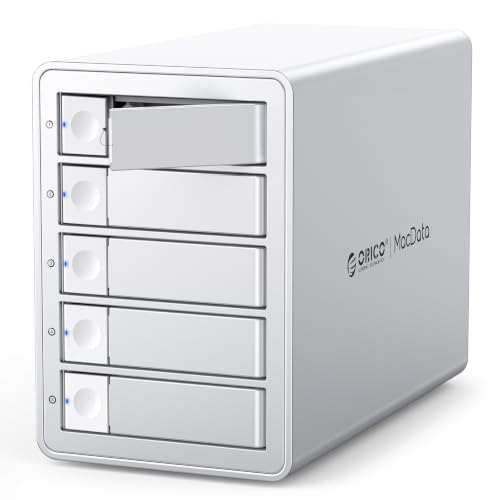
- RAID 0/1/5/10, JBOD, and Normal modes
- Up to 130TB total capacity with five bays
- USB 3.2 Gen 2x2 up to 20Gbps
Best For: Businesses needing a fast 5-bay enclosure with more storage headroom
Flexible 4-Bay Business DAS
MAIWO 4-Bay 3.5" SATA RAID Enclosure

- Supports RAID 0/3/5/1/10, Clone, and JBOD
- Up to 96TB with four 24TB 3.5" drives
- Includes dual cooling fans and USB cables
Best For: Small businesses needing flexible, high-capacity 3.5" RAID storage
Scalable 5-Bay Office Storage
Yottamaster 5-Bay RAID Hard Drive Enclosure
- Supports RAID 0/1/3/5/10/JBOD/CLONE
- Up to 110TB across 2.5" and 3.5" drives
- 80mm fan and aluminum shell help cooling
Best For: Small offices needing expandable multi-drive storage
Compact Two-Drive Backup Pick
MAIWO Dual-Bay 2.5" RAID Enclosure

- Supports RAID 0, RAID 1, JBOD, and NORMAL
- Tool-free setup with hot swapping
- Up to 16TB for 2.5" SSDs and HDDs
Best For: Small teams needing compact mirrored backup storage
Flexible 5-Bay RAID – Yottamaster 5-Bay USB-C DAS
If you need raid enclosures for small businesses that can handle shared backups, media archives, or mixed SSD/HDD workflows, this Yottamaster 5-bay DAS is built for flexibility. It supports multiple RAID modes, offers up to 110TB of capacity, and uses a USB-C connection for straightforward deployment on Windows, Mac, or Linux systems.
Best For: Small teams that want a 5-bay RAID enclosure with broad mode support and high-capacity storage.
Pros:
- Supports RAID 0/1/3/5/10/JBOD/CLONE for different backup and performance needs
- Fits both 2.5-inch and 3.5-inch SATA HDDs/SSDs with up to 110TB total capacity
- Aluminum alloy body and 80mm temperature-controlled fan help with cooling
- USB-C / USB 3.1 connection works with Windows, Mac, and Linux
Cons:
- New drives may need to be formatted and partitioned before use
- Total drive power draw must stay within the stated 78W limit
For small offices that want hardware RAID options without moving up to a full server, this enclosure offers strong capacity and mode flexibility. The tradeoff is that you’ll want to plan power and drive compatibility carefully, especially with higher-draw disks.
Compact 2-Bay RAID – TERRAMASTER D2-320 2-Bay DAS
The TERRAMASTER D2-320 is a practical choice for raid enclosures for small businesses that want a compact two-drive setup for backup or faster local storage. It uses USB 3.2 Gen2 for up to 10Gbps transfer, supports several RAID modes, and is designed as a direct-attached storage unit rather than a NAS.
Best For: Small offices needing a simple 2-bay hardware RAID enclosure for backup, mirroring, or everyday DAS use.
Pros:
- USB 3.2 Gen2 connection supports up to 10Gbps transfer speeds
- RAID 0, RAID 1, JBOD, and SINGLE modes cover common small-business needs
- Tool-free trays and push-lock design make drive changes easier
- Intelligent fan automatically adjusts cooling based on drive temperature
Cons:
- Only supports two drives, so total capacity is more limited than 4- or 5-bay units
- It is a DAS, not a NAS, so it does not function as network storage
If your priority is simple redundancy or a fast external storage pair, the D2-320 keeps setup approachable. It’s not built for large-scale expansion, but it does a solid job for compact office backups and mirrored storage.
Heavy-Duty 5-Bay RAID – ORICO 5-Bay RAID Station
For raid enclosures for small businesses that need dependable multi-drive storage, this ORICO 5-bay DAS combines broad RAID support with a built-in power supply and heavy-duty cooling. It supports up to 110TB total capacity, works with 2.5-inch and 3.5-inch SATA drives, and is aimed at long-term desktop backup or media workflows.
Best For: Small businesses that want a robust 5-bay storage station with built-in power and flexible RAID modes.
Pros:
- Supports RAID 0, 1, 3, 5, 10, JBOD, Clone, and Clear modes
- Built-in 150W power supply avoids a separate bulky adapter
- Aluminum alloy shell and 80mm fan are designed for 24/7 cooling
- Works across Windows, Mac, and Linux without drivers
Cons:
- Uses USB 3.0, so transfer speed is lower than newer 10Gbps models
- Capacity note says 110TB in the feature list, despite the title mentioning 130TB max
This is a good fit when stability and drive versatility matter more than cutting-edge interface speed. The built-in power supply and cooling-focused design make it especially practical for a busy office desk or studio rack.
Business Backup RAID – QNAP TR-004 4-Bay RAID DAS
QNAP TR-004 4 Bay USB Type-C Direct Attached Storage (DAS) with hardware RAID (Diskless)
Check Price On AmazonThe QNAP TR-004 is a straightforward option among raid enclosures for small businesses that want external storage for backup or NAS expansion. It connects over USB Type-C, supports several hardware RAID modes, and includes lockable bays for a more secure desktop setup.
Best For: Small businesses using a QNAP NAS or needing a lockable 4-bay RAID DAS for backup and expansion.
Pros:
- Supports RAID 0, 1, 5, JBOD, and individual disks
- USB Type-C connection works with Windows, macOS, and Linux
- Lockable drive bays add physical security
- Can be used as external storage for NAS backup or to expand a QNAP NAS
Cons:
- Compatibility is limited with certain older QNAP NAS models
- NAS applications cannot be installed on the TR-004 itself
For teams already in the QNAP ecosystem, this enclosure is especially useful as a backup or expansion device. It’s less of a standalone platform and more of a dependable companion unit for structured storage workflows.
Fast 4-bay RAID option – ORICO 4-Bay 20Gbps RAID Enclosure
If you need raid enclosures for small businesses that handle large files, this ORICO 4-bay model is built for fast transfers, flexible RAID setup, and long-term storage expansion. Its USB 3.2 Gen 2×2 connection, JMS591 chipset, and support for up to 104TB make it a practical fit for shared media, backup, and departmental storage.
Best For: Small teams that want a fast 4-bay RAID enclosure for video files, backups, or general business storage.
Pros:
- Supports RAID 0, 1, 5, 10, JBOD, and Normal modes for different protection and performance needs.
- USB 3.2 Gen 2×2 interface is rated up to 20Gbps, with USB4 able to reach full bandwidth.
- Supports up to 104TB total capacity with 26TB drives in the four bays.
- Built-in 150W power supply, hot-swapping, and a low-noise cooling fan support steady operation.
Cons:
- Changing RAID mode erases drive contents, so setup requires careful planning and backups.
- Thunderbolt connections are limited to about 10Gbps instead of the full 20Gbps.
Overall, this is a strong choice if your business values speed and RAID flexibility in a compact 4-bay enclosure. It is especially appealing for teams moving large files and wanting a higher-performance desktop storage box without adding extra adapters.
Most flexible 5-bay pick – UGREEN 5-Bay USB-C RAID Enclosure
For raid enclosures for small businesses that need flexibility more than raw speed, this UGREEN 5-bay DAS is a practical storage hub. It offers 8 storage and RAID modes, up to 160TB total capacity, and broad compatibility across Windows, macOS, and Linux, making it a useful fit for backup workflows and drive reuse.
Best For: Small businesses that want a high-capacity 5-bay enclosure with multiple RAID choices and straightforward USB-C connectivity.
Pros:
- 8 modes include PM, RAID 0, RAID 1/3/5/10, Large, and Clone.
- Supports up to five SATA HDDs or SSDs and up to 160TB total capacity.
- Smart cooling uses S.M.A.R.T. temperature data to adjust fan speed automatically.
- Independent LEDs help track drive presence, RAID status, and rebuilding activity.
Cons:
- USB 3.2 Gen 1 tops out at 5Gbps, so it is slower than 20Gbps models.
- Changing RAID modes requires reformatting, so you need backups before setup changes.
This enclosure makes sense when storage capacity, compatibility, and RAID variety matter more than top-end throughput. It is a straightforward option for businesses reusing existing drives and organizing backup-heavy workflows.
Highest-capacity 5-bay pick – ORICO 5-Bay 20Gbps RAID Enclosure
If your business needs raid enclosures for small businesses with more room to grow, this ORICO 5-bay model adds higher capacity without giving up the same fast 20Gbps class interface. With support for up to 130TB, six RAID modes, hot-swapping, and a built-in 150W power supply, it is geared toward demanding storage and backup workloads.
Best For: Small businesses that want a higher-capacity 5-bay RAID enclosure for large files, backups, and professional storage use.
Pros:
- Supports RAID 0, 1, 5, 10, JBOD, and Normal modes.
- USB 3.2 Gen 2×2 interface is rated up to 20Gbps for faster file transfers.
- Supports up to 130TB total capacity with 26TB drives in five bays.
- Includes hot-swapping, low-noise cooling, and a built-in 150W power supply.
Cons:
- Changing RAID mode erases drive contents, so setup must be planned carefully.
- Thunderbolt connections are limited to about 10Gbps instead of full 20Gbps speed.
This is the strongest fit when you want a 5-bay enclosure with the same high-speed connectivity as the smaller ORICO model, but with more total capacity. It is a good match for teams handling larger archives or heavier media workloads.
Flexible 4-Bay Business DAS – MAIWO 4-Bay 3.5" SATA RAID Enclosure
If you need raid enclosures for small businesses that can handle backups, shared storage, or surveillance footage, this MAIWO 4-bay DAS is built around flexibility. It supports a wide range of RAID modes, including Normal, 0, 3, 5, 1/10, Clone, and Large (JBOD), plus it offers up to 96TB of capacity for larger data sets.
Best For: Small teams that want a flexible 4-bay enclosure for backups, redundancy, or media storage.
Pros:
- Supports multiple RAID modes, including RAID 0, 3, 5, 1/10, Clone, and JBOD
- Up to 96TB capacity with support for four 24TB 3.5″ SATA drives
- Includes two cooling fans to help maintain operating temperatures
- Comes with USB-A to USB-C and USB-C to USB-C cables
Cons:
- Designed for 3.5″ SATA drives only, not 2.5″ media
- Cooling fans are switch-controlled rather than fully automatic
- Large capacity may be more than some small offices need
Overall, this is a practical pick if your business wants RAID flexibility without moving up to a more complex storage system. The combination of multi-mode RAID support, strong capacity, and active cooling makes it well suited to steady day-to-day use.
Scalable 5-Bay Office Storage – Yottamaster 5-Bay RAID Hard Drive Enclosure
For raid enclosures for small businesses that need room to grow, this Yottamaster 5-bay model focuses on capacity and configurable protection. It supports up to 110TB across 2.5″ and 3.5″ SATA HDDs or SSDs, and it offers RAID 0/1/3/5/10/JBOD/CLONE options for different performance and redundancy needs.
Best For: Small offices and content teams that need a versatile 5-bay enclosure with strong capacity.
Pros:
- Supports up to 110TB with five 22TB drives
- Works with both 2.5″ and 3.5″ SATA HDDs and SSDs
- Offers hardware and software RAID setup options
- 80mm intelligent fan adjusts speed automatically for cooling
Cons:
- Five-bay design may be more storage than very small teams need
- New drives may need formatting and partitioning before use
- Uses a USB 3.0 Type B interface rather than a direct USB-C host port
This enclosure makes sense when you want a business storage box that can scale with heavier file loads. Its mix of multi-drive support, RAID flexibility, and temperature-controlled cooling gives it broad utility for office or studio workflows.
Compact Two-Drive Backup Pick – MAIWO Dual-Bay 2.5" RAID Enclosure
If your priority is a compact choice among raid enclosures for small businesses, this MAIWO dual-bay model is geared toward simple, portable storage. It supports 2.5″ SATA SSDs and HDDs, offers RAID 0, RAID 1, LARGE (JBOD), and NORMAL modes, and provides up to 16TB total capacity.
Best For: Small businesses that want a small, tool-free enclosure for mirrored backups or portable storage.
Pros:
- Supports 2.5″ SATA SSDs and HDDs in both bays
- Tool-free setup makes installation quick and simple
- Offers RAID 0, RAID 1, JBOD, and NORMAL modes
- Includes hot swapping and LED indicators for easier use
Cons:
- Limited to 16TB total capacity
- Only supports 2.5″ drives, not 3.5″ desktop disks
- ABS plastic construction is less rugged than metal enclosures
This is the most compact option here, so it fits best when desk space, portability, and straightforward setup matter more than maximum expandability. For small-business backups or light shared storage, it covers the essentials without adding complexity.
How We Picked the Best Raid Enclosures for Small Businesses
We prioritized Raid Enclosures for Small Businesses that balance value, reliability, and ease of deployment. The strongest options support common SATA drives, offer multiple RAID modes, and provide connectivity that won’t bottleneck everyday file transfers. We also looked at enclosure build quality, cooling, and whether the product makes sense for solo operators, small teams, or growing offices.
Quick Comparison
Two-bay models are the simplest fit for basic backup and mirrored storage. Four-bay enclosures offer a better balance of redundancy and capacity for a small office, while five-bay models are better when growth and larger project libraries matter. If you need faster large-file workflows, look closely at USB-C and USB 3.2 Gen 2 or Gen 2×2 support. If you want low-fuss storage, hardware RAID and straightforward setup are worth prioritizing.
Key Buying Factors for Raid Enclosures for Small Businesses
RAID Mode Support
Choose an enclosure that supports the RAID level you actually need. RAID 1 is ideal for simple mirroring and protection, while RAID 5 or RAID 10 can improve usable capacity and resilience for multi-drive setups. JBOD or normal modes are useful when you want each drive treated separately.
Drive Compatibility and Capacity
Check whether the enclosure supports 2.5-inch SSDs, 3.5-inch HDDs, or both. Mixed support can be helpful, but some businesses will get better value by standardizing on one drive type. Also confirm the maximum supported capacity if you expect to grow over time.
Speed and Connection Type
For most small offices, USB-C is the most practical choice. Faster interfaces matter most for large media files, backups, and frequent transfers. If your workflow is mostly documents and light file sharing, stability may matter more than top-end speed.
Cooling and Build Quality
More bays can mean more heat, so cooling design matters. Aluminum bodies and active fans help maintain performance and drive health during long write sessions. A sturdy enclosure is especially important if the unit will stay powered on all day.
Who Should Buy Which Raid Enclosures for Small Businesses?
Solo users and very small teams often do well with a two-bay unit for mirrored backup. Creative teams, agencies, and growing offices usually benefit from four-bay enclosures because they offer a better blend of protection and usable space. Five-bay models are best for businesses that expect rapid storage growth or need room for large archives, project media, and local backups. If you want one simple recommendation, match the enclosure size to your backup strategy first, then choose the fastest interface your budget reasonably allows.