
The best plotter printer for a small business depends on what you produce most: technical drawings, posters, signage, decals, or fine-art prints. The right model can reduce outsourcing costs while fitting your available space, workflow, and budget.
These 10 picks cover practical 24-inch printers, wider 36-inch models, a multifunction option, a vinyl cutter, and a dedicated fine-art printer. Use the guide below to narrow the list by output type, media needs, operating costs, and support.
Best 10 Plotter Printers for Small Businesses Picks for 2026
Best Overall CAD Plotter

- Supports 24-inch roll media with roll and sheet feeding
- Includes HP Click error checking and auto-nesting tools
- Provides accurate output for CAD drawings, maps, and posters
Best For: Small design, architecture, engineering, and pattern-making businesses
Best for Vinyl Signage
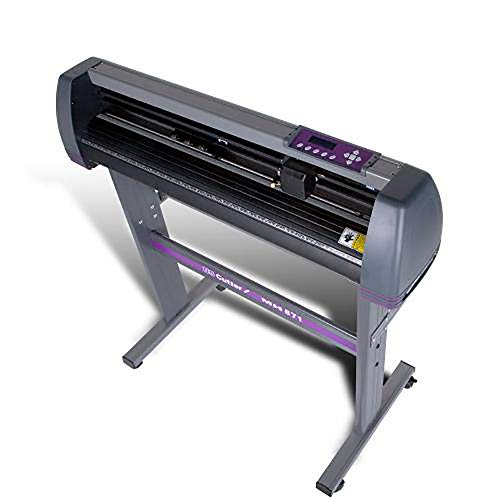
- Cuts media up to 30 inches wide
- Includes stand and VinylMaster Cut software
- Offers adjustable rollers, speed, and pressure
Best For: Small sign, decal, banner, and apparel businesses
Best Multifunction Option

- Prints up to A1 size and supports 24-inch rolls
- Adds flatbed scanning, copying, and enlargements
- Includes automatic sheet feeding and cloud connectivity
Best For: Small offices needing wide-format print, scan, and copy functions
Best Supported CAD Plotter
HP DesignJet T210 with Care Pack
- Includes a two-year HP Care Pack with onsite support
- Prints technical documents and posters on media up to 24 inches wide
- Provides HP Click automation and HP/GL-2 support
Best For: CAD-focused businesses prioritizing longer warranty and onsite support
Fine-Art Detail Specialist
Canon PRO 2100 24-Inch Printer
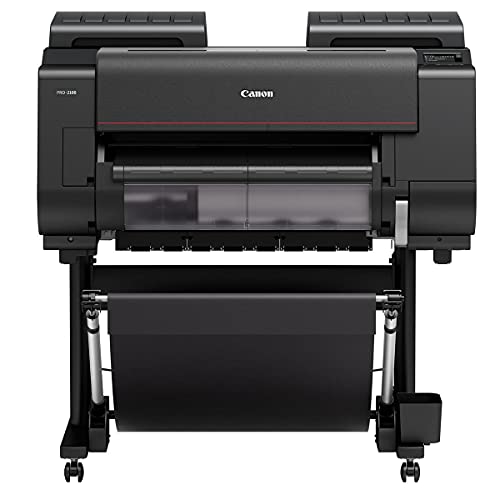
- 2400 x 1200 dpi color output
- 12-color ink system for fine-art work
- Supports media up to 24 x 59 inches
Best For: Fine-art studios and photo-focused small businesses
Workflow-Friendly CAD Workhorse

- Prints rolls up to 36 inches wide
- Automatic sheet/roll switching
- Includes two-year onsite support
Best For: Architecture, engineering, and construction offices
Durable Technical-Print Option

- 24-inch wide-format printing
- UV- and water-resistant five-color ink
- Ethernet, USB, and Wi-Fi connectivity
Best For: Technical documents, job-site prints, and outdoor signage
Best Overall
HP DesignJet T630 36-inch Plotter

- Prints on rolls up to 36 inches wide
- Includes sheet feeder, stand, and media bin
- Supports Ethernet, Wi-Fi, and USB
Best For: Small businesses needing flexible CAD, map, poster, and technical printing
Best Compact Option
HP DesignJet T230 24-inch Plotter

- Supports roll media up to 24 inches wide
- Compact 47.4-pound design
- Includes a 2-year Care Pack
Best For: Small offices with limited space and moderate wide-format needs
Best for Professional Workflows
HP DesignJet T850 36-inch Plotter

- Handles 36-inch rolls and 13-by-19-inch sheets
- Includes an integrated 50-sheet input tray
- Two years of onsite and phone support included
Best For: AEC, GIS, and MCAD teams with frequent mixed-size print jobs
Best Overall CAD Plotter – HP DesignJet T210 24-Inch
HP DesignJet T210 Large Format 24-inch Plotter Printer, for Easy CAD & Poster Prints (8AG32D)
Check Price On AmazonFor small businesses comparing plotter printers for small businesses, the HP DesignJet T210 is a practical choice for technical drawings, posters, maps, and sewing patterns. It supports 24-inch rolls, offers both roll and sheet feeding, and includes workflow tools designed to reduce setup and paper waste.
Best For: Small architecture, engineering, construction, design, and pattern-making businesses that need accurate wide-format color output.
Pros:
- Prints up to 24-inch-wide media and supports multiple file formats, including PDF, JPEG, TIFF, DWF, HP-GL/2, and PNG.
- HP Click software provides PDF error checking, alerts, auto-nesting, and drag-and-drop job submission.
- Supports roll feed, sheet feed, and automatic horizontal cutting.
- Offers Wi-Fi, Ethernet, USB, HP Smart app access, and a one-year limited hardware warranty.
Cons:
- The automatic sheet feeder for sheets up to 13 by 19 inches is optional.
- It uses HP 712 ink cartridges and an HP 713 printhead.
- At 47.4 pounds and 40 inches wide, it needs a dedicated workspace.
The T210 balances CAD-focused functionality, accessible software, and flexible media handling. It is especially well suited to businesses that need dependable line quality and occasional poster or map printing without moving up to a more specialized production machine.
Best for Vinyl Signage – USCutter 34-Inch Vinyl Cutter
Businesses looking beyond inkjet output may prefer this USCutter vinyl cutter when evaluating plotter printers for small businesses. Its 34-inch feed width and 30-inch cut width are suited to producing decals, signs, banners, and heat-transfer graphics in-house.
Best For: Home-based businesses, sign makers, apparel decorators, and small shops producing cut vinyl graphics.
Pros:
- Provides a 34-inch feed width and 30-inch cutting width.
- Includes a stand and VinylMaster Cut software for creating or vectorizing artwork.
- Adjustable pinch rollers, speed, and pressure support different vinyl jobs.
- Includes US-based technical support and lifetime phone support.
Cons:
- This is a vinyl cutter rather than a color inkjet printer, so it does not print full-color images.
- Its primary media applications are signs, banners, decals, and heat-transfer materials.
- The 47-pound unit and stand require dedicated floor space.
The USCutter is a focused production tool for businesses whose work centers on cut graphics rather than CAD documents or printed posters. The included software and support can make it a useful entry point for bringing basic signage and apparel decoration in-house.
Best Multifunction Option – Canon imagePROGRAF TC-21M
The Canon imagePROGRAF TC-21M stands out among plotter printers for small businesses that need more than wide-format printing. Along with printing up to A1 size and on 24-inch rolls, it includes a flatbed scanner, copying, cloud connectivity, and a USB flash drive port.
Best For: Offices that need wide-format printing plus scanning, enlargements, copying, and flexible document input.
Pros:
- Prints on roll media up to 24 inches wide and supports sizes from letter through A1.
- Flatbed scanning enables enlargements and direct copying of smaller originals.
- The automatic sheet feeder holds up to 100 letter-size sheets or 50 sheets of 11 by 17-inch paper.
- Offers a tiltable 2.7-inch touchscreen, cloud printing and scanning, Wi-Fi, Ethernet, and USB connectivity.
Cons:
- It uses simplex printing rather than automatic duplex printing.
- Its listed output is up to 8 color pages per minute and 16 black-and-white pages per minute for standard pages.
- The multifunction design may be more capability than a business needing print-only CAD output requires.
The TC-21M is a strong fit when scanning and copying are part of the daily workflow. Its combination of A1-capable printing, roll support, an automatic sheet feeder, and office-friendly connectivity gives small teams a versatile all-in-one option.
Best Supported CAD Plotter – HP DesignJet T210 with Care Pack
For small businesses comparing plotter printers for small businesses with support coverage in mind, this HP DesignJet T210 bundle adds a two-year HP Care Pack with onsite support. The underlying printer is built for technical drawings, blueprints, maps, posters, indoor signage, and other 24-inch-wide projects.
Best For: Architecture, engineering, construction, and design businesses that value onsite support and longer warranty coverage.
Pros:
- Includes a two-year HP Care Pack with onsite support.
- Handles up to 24-inch-wide rolls with roll feed, sheet feed, and an automatic horizontal cutter.
- HP Click offers PDF error checking, alerts, auto-nesting, and simple multi-file submission.
- Supports HP/GL-2, direct printing from design and CAD applications, and remote management through the HP Smart app.
Cons:
- The automatic sheet feeder for sheets up to 13 by 19 inches is optional.
- It requires HP 712 ink cartridges and an HP 713 printhead.
- At 59.9 pounds and 40 inches wide, it is relatively substantial for a small office.
This version offers the same CAD-oriented workflow and wide-format flexibility as the T210 platform while adding a longer support commitment. For a business where printer downtime could interrupt client work, the included onsite coverage may justify choosing this bundle over the standard configuration.
Fine-Art Detail Specialist – Canon PRO 2100 24-Inch Printer
For small businesses comparing plotter printers for small businesses, the Canon PRO-2100 is built around high-resolution color output for fine-art and photo-oriented work. It supports media up to 24 inches wide and uses a 12-color ink set with both photo and matte black options.
Best For: Fine-art studios, photographers, and businesses that prioritize detailed, wide-format color prints.
Pros:
- 2400 x 1200 dpi color resolution supports detailed output.
- 12-color ink configuration includes photo black, matte black, gray, and specialty colors.
- Supports media up to 24 x 59 inches and offers Ethernet connectivity.
- Includes a one-year Canon on-site warranty through the listed reseller.
Cons:
- Its 49-inch width and 33-inch height require substantial workspace.
- It is a print-only device rather than a multifunction office machine.
- The feature set is likely more specialized than necessary for basic technical documents.
The PRO-2100 makes the most sense when image quality and fine-art color are central to the business. Its large footprint and specialized ink system are trade-offs for that emphasis.
Workflow-Friendly CAD Workhorse – HP DesignJet T650 36-Inch
The HP DesignJet T650 is a practical option for small businesses evaluating plotter printers for small businesses, especially those producing CAD drawings, maps, posters, and renders. Its 36-inch roll capacity, automatic sheet-and-roll switching, and included HP Click software are designed to reduce hands-on file and media management.
Best For: Architecture, engineering, construction, and other offices printing technical drawings and mixed-size wide-format projects.
Pros:
- Handles rolls up to 36 inches wide plus sheets up to 13 x 19 inches.
- Automatic sheet/roll switching and horizontal cutting simplify production.
- HP Click provides PDF checking, alerts, auto-nesting, and drag-and-drop printing.
- Includes two-year onsite HP Care Pack support and Ethernet, USB, and Wi-Fi connectivity.
Cons:
- Its 52-inch width and 37-inch height demand dedicated floor space.
- Optimal operation requires HP OEM 712 ink and a 713 printhead.
- The thermal plotter is geared toward office and technical workflows rather than specialized fine-art printing.
Among these options, the T650 is the most workflow-oriented choice for offices that regularly switch between technical sheets and large rolls. The included software and onsite coverage add convenience for teams with recurring production needs.
Durable Technical-Print Option – Canon imagePROGRAF TM-240
The Canon imagePROGRAF TM-240 gives small businesses considering plotter printers for small businesses a balance of technical precision, speed, and durable output. Its five-color, UV- and water-resistant ink system is suited to sharp line work, outdoor job-site documents, posters, and signs.
Best For: Construction, technical, and office users that need crisp plans, maps, posters, or signage with added resistance to outdoor conditions.
Pros:
- Prints up to 24 inches wide at speeds up to 3.2 ppm for a 24 x 36-inch sheet.
- 2400 x 1200 dpi maximum color resolution and a 15,360-nozzle printhead support sharp lines and text.
- UV- and water-resistant ink can suit outdoor job-site documents and displays.
- Offers Ethernet, USB, and Wi-Fi connectivity plus automatic media detection.
Cons:
- Its 24-inch maximum width is narrower than the HP T650’s 36-inch capacity.
- The listed 88.2-pound weight may make placement and relocation difficult.
- It uses a five-color system, so it is less specialized for fine-art color than the 12-color Canon PRO-2100.
The TM-240 is a strong middle ground for businesses that need both precise technical output and media durability. It is particularly compelling when prints may be exposed to job-site or outdoor conditions.
Best Overall – HP DesignJet T630 36-inch Plotter
For small businesses that need broad media flexibility, the HP DesignJet T630 is a capable choice among plotter printers for small businesses. It handles rolls up to 36 inches wide as well as sheets up to 13 by 19 inches, making it suitable for both technical documents and presentation-quality graphics.
Best For: Architecture, engineering, construction, maps, GIS, posters, and precise CAD line drawings.
Pros:
- Supports 36-inch media rolls and 13-by-19-inch sheets.
- Includes an automatic sheet feeder, media bin, stand, and automatic sheet/roll switching.
- HP Click software helps with PDF error checking, print previews, alerts, and auto-nesting.
- Offers Ethernet, USB, and Wi-Fi connectivity.
Cons:
- At 123 pounds, it requires substantial floor space and is not easy to move.
- Uses HP OEM 712 and 713 ink cartridges.
The T630 is a strong all-purpose option when a small business needs a 36-inch plotter with convenient media handling and workflow features. Its included stand and sheet feeder add value for teams switching regularly between rolls and sheets.
Best Compact Option – HP DesignJet T230 24-inch Plotter
The HP DesignJet T230 is a practical entry point for small businesses that need wide-format output without the footprint of a larger 36-inch machine. As plotter printers for small businesses go, it combines 24-inch roll printing with support for technical drawings, blueprints, posters, signage, maps, and patterns.
Best For: Smaller offices, architects, engineers, contractors, and businesses printing documents up to 24 inches wide.
Pros:
- Compact design weighs 47.4 pounds and measures 40 inches wide.
- Prints on media rolls up to 24 inches wide.
- Automatically handles multi-size projects and includes an automatic horizontal cutter.
- Includes a 2-year Care Pack with extended warranty support.
Cons:
- The automatic sheet feeder for sheets up to 13 by 19 inches is optional.
- Its 24-inch maximum roll width is less versatile than 36-inch models.
- Uses HP OEM 712 and 713 ink cartridges.
The T230 makes sense when available space, portability, and operating costs matter more than maximum print width. Its included two-year support package can also provide useful reassurance for a small office adopting its first plotter.
Best for Professional Workflows – HP DesignJet T850 36-inch Plotter
The HP DesignJet T850 is designed for small businesses producing demanding AEC, GIS, and MCAD work. It supports 36-inch rolls while also offering an integrated input tray for half-size jobs, reducing the need to manually switch between roll and sheet media.
Best For: Architecture, engineering, construction, GIS, technical drawings, maps, posters, and detailed renders.
Pros:
- Prints on rolls up to 36 inches wide and sheets up to 13 by 19 inches.
- Integrated 50-sheet input tray supports half-size print jobs.
- Includes a stand, media bin, automatic cutter, and 1 GB of memory.
- Comes with two years of onsite and phone support.
Cons:
- Its 55.4-inch width and 27.6-inch depth require considerable workspace.
- Compatible HP 738 DesignJet ink is required.
- It is a specialized print-only device rather than an all-in-one printer.
The T850 is a compelling fit for businesses that regularly alternate between large drawings and smaller print jobs. Its integrated tray, workflow tools, pigment-based inks, and included onsite support make it well suited to professional production environments.
How We Picked These Plotter Printers for Small Businesses
We focused on models suited to common small-business workloads, including CAD plans, architectural drawings, posters, marketing graphics, decals, signage, and gallery-quality artwork. We considered maximum media width, printer or cutter functionality, workflow convenience, included software, connectivity, warranty coverage, and the practical value of features such as stands, media bins, automatic sheet feeding, and onsite support.
The selection includes both inkjet plotter printers and a vinyl cutter plotter. Because these machines serve different purposes, compare the intended output before comparing prices. A cutter is appropriate for adhesive graphics and lettering, while a large-format printer is designed to print on paper, coated media, canvas, or other compatible materials.
Quick Comparison
| Business need | Best fit | What to prioritize |
|---|---|---|
| CAD and technical documents | 24-inch HP DesignJet or Canon models | Line accuracy, speed, roll handling, and reliable connectivity |
| Large signs and plans | 36-inch HP DesignJet models | Wider media support, stand, media handling, and service coverage |
| Vinyl lettering and decals | USCutter vinyl cutter | Cutting width, included software, blade control, and support |
| Fine-art and photographic work | Canon imagePROGRAF PRO 2100 | Color management, ink range, media compatibility, and print longevity |
| Scanning, copying, and printing | Canon imagePROGRAF TC-21M | Multifunction capability, footprint, and document workflow |
Key Buying Factors for Plotter Printers for Small Businesses
Output Type and Media Width
Start with the materials and finished sizes you sell. A 24-inch machine is often easier to install and sufficient for architectural sheets, posters, and moderate signage. Choose a 36-inch model when clients routinely request wider construction plans, banners, or display graphics. If your primary product is cut vinyl, use a cutter rather than a printer.
Print Quality and Color Requirements
CAD users should look for crisp lines, consistent small text, and dependable scaling. Graphic and fine-art businesses need stronger color controls, broader ink capabilities, and support for premium media. Remember that advertised resolution is only one part of real-world quality; paper choice, ink, and color-management settings matter too.
Workflow, Space, and Running Costs
Check roll loading, sheet feeding, automatic cutting, print speed, connectivity, and software compatibility. Measure the complete footprint, including the stand and room for media. Also estimate ink, maintenance, replacement blades, and specialty media costs rather than judging value by purchase price alone.
Warranty and Business Support
For a revenue-producing machine, downtime can cost more than a modestly higher purchase price. Onsite warranty coverage, technical phone support, replacement-part availability, and included service plans can be especially valuable for businesses without an in-house technician.
Who Should Buy Which Plotter Printers for Small Businesses?
Choose a compact 24-inch HP DesignJet or Canon printer if you need dependable CAD drawings, posters, or everyday wide-format documents in a smaller workspace. Move to a 36-inch HP DesignJet when wider plans and signage justify the additional footprint and media capacity.
Choose the USCutter if your business creates vinyl decals, window graphics, lettering, or heat-transfer designs. Select the Canon PRO 2100 if color-critical fine-art or photographic output is your main source of revenue. For businesses that scan, copy, and print large documents, the Canon imagePROGRAF TC-21M offers a more versatile workflow. Finally, prioritize models with extended onsite coverage when production continuity matters more than the lowest upfront cost.