
Great video starts with clear, intelligible sound. The right condenser microphone for YouTube can make voiceovers, tutorials, livestreams, interviews, and gaming content sound more polished without requiring a professional studio.
We’ve selected 10 popular USB and hybrid microphones for different budgets and recording setups. The options below prioritize useful controls, pickup patterns, monitoring features, connectivity, and creator-friendly accessories.
Best 10 Condenser Microphone for Youtube Picks for 2026
Versatile Creator Pick

- Four pickup patterns for varied recording setups
- Onboard controls and no-latency monitoring
- USB plug-and-play design with Blue VO!CE support
Best For: YouTube creators recording videos, streams, podcasts, and interviews
Upgrade-Ready Studio Kit
MAONO A04 Gen2 Condenser Microphone

- USB and XLR connectivity for flexible setups
- 192kHz/24-bit USB recording with software controls
- Includes arm stand, shock mount, pop filter, and windscreen
Best For: YouTube creators who want a complete kit with an XLR upgrade path
Gaming Streamer Choice
FIFINE AmpliGame A6V USB Microphone

- Quick mute button and front gain control
- RGB lighting with seven gradient colors
- Includes shock mount, pop filter, and tripod
Best For: Gaming YouTubers and streamers who want easy controls and RGB
Complete Boom-Arm Value
FIFINE T669 USB Studio Microphone
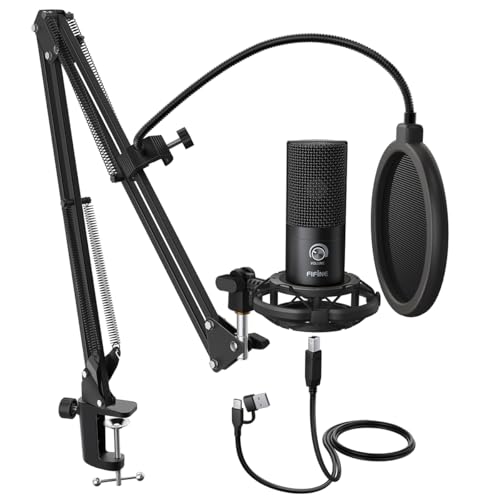
- Plug-and-play USB recording for PCs and laptops
- Includes adjustable boom arm and shock mount
- Double pop filter helps reduce plosive sounds
Best For: YouTube voiceovers, tutorials, podcasts, and desk-based streaming
Best All-Around Features
ZealSound K66 Pro USB Microphone

- Cardioid condenser capsule for detailed vocals
- Onboard gain, echo, mute, and monitoring controls
- Compatible with computers, phones, tablets, and major recording platforms
Best For: Creators who want flexible controls and device compatibility
Best Complete Starter Kit
MAONO A04 USB Condenser Microphone

- 192kHz/24-bit USB recording chipset
- 16mm capsule for clear vocals and bass response
- Includes arm, shock mount, pop filter, and windscreen
Best For: New creators who want an all-in-one recording setup
Best Compact Desktop Option
CMTECK G009 USB Computer Microphone

- Small desktop base with adjustable 360-degree gooseneck
- Mute button with red and green LED status indicators
- Plug-and-play USB setup for supported Windows and Mac devices
Best For: Desk-based creators with limited space
Best RGB Gaming Pick
FIFINE AmpliGame A6T USB Microphone Kit

- Plug-and-play USB setup for PC, Mac, PS4, and PS5
- Cardioid pickup with mute and volume controls
- Includes boom arm, shock mount, pop filter, and RGB lighting
Best For: YouTube creators and gamers building an adjustable RGB recording setup
Best Compact Starter
TONOR TC-777 USB Podcast Microphone

- Simple plug-and-play USB setup
- Cardioid pickup for clearer front-facing speech
- Includes tripod, shock mount, pop filter, mute, and volume control
Best For: Beginners recording YouTube content from a compact desk
Best All-in-One RGB Kit
TONOR TC310+ USB Gaming Microphone

- Complete boom-arm, shock-mount, and pop-filter package
- Customizable RGB modes with brightness control
- Tap mute and rotating gain control for live recording
Best For: Streamers and creators wanting an adjustable RGB arm-mounted setup
Versatile Creator Pick – Blue Yeti USB Microphone
The Blue Yeti is a versatile condenser microphone for YouTube creators who want plug-and-play USB recording with flexible pickup options. Its onboard controls and included desktop stand make it practical for videos, streaming, podcasts, and voice recording.
Best For: YouTube creators who record different formats and want multiple pickup patterns.
Pros:
- Four pickup patterns support solo vocals, interviews, instruments, and group recording.
- Onboard gain, mute, pattern, and headphone controls simplify recording adjustments.
- Blue VO!CE software adds vocal effects, modulation, samples, and audio customization.
- Plug-and-play USB setup includes a positionable desktop stand and no-latency monitoring.
Cons:
- The microphone and stand weigh 3.2 pounds, so it may be substantial for some setups.
- USB connectivity is convenient but does not provide an XLR upgrade path.
Choose the Blue Yeti if you value versatility and easy controls over a compact, minimal setup. Its four patterns make it especially adaptable for growing YouTube channels.
Upgrade-Ready Studio Kit – MAONO A04 Gen2 Condenser Microphone
The MAONO A04 Gen2 is a flexible condenser microphone for YouTube users who want USB convenience now and XLR connectivity later. It combines a 192kHz/24-bit USB mode with software controls and a complete boom-arm accessory kit.
Best For: Creators who want a bundled setup with both USB and XLR connection options.
Pros:
- USB and XLR outputs support direct computer recording or connection to an interface or mixer.
- MAONO Link software offers gain, noise reduction, EQ presets, compression, and limiting in USB mode.
- Cardioid pickup, a 16mm capsule, pop filter, and foam windscreen help focus voice recording.
- The package includes a shock mount, adjustable arm stand, pop filter, and windscreen.
Cons:
- An XLR cable is not included.
- XLR use requires phantom power.
- The desk clamp is designed for desktops less than 2.1 inches thick.
The A04 Gen2 is a strong choice for creators building toward more advanced audio equipment. Its dual connectivity and included accessories make it more adaptable than a USB-only microphone.
Gaming Streamer Choice – FIFINE AmpliGame A6V USB Microphone
The FIFINE AmpliGame A6V is a gaming-focused condenser microphone for YouTube streaming and video creation. It offers plug-and-play USB operation, a quick mute button, a gain knob, RGB lighting, and accessories designed to reduce vibration and plosive noise.
Best For: Gaming YouTubers and streamers who want simple controls and customizable RGB lighting.
Pros:
- The 192kHz sampling rate and cardioid pattern support detailed front-facing voice capture.
- A tap-to-mute button and dedicated gain knob provide fast control during live sessions.
- Seven gradient RGB colors add visual customization to a streaming setup.
- The package includes a shock mount, pop filter, tripod, and detachable 6.6-foot USB cable.
Cons:
- It uses USB connectivity rather than offering an XLR output.
- The included tripod provides less reach and positioning flexibility than a boom arm.
- It is incompatible with Xbox.
For gaming-focused YouTube channels, the A6V emphasizes convenience and on-camera style. It is a practical fit when quick muting, easy gain adjustment, and RGB lighting matter as much as voice capture.
Complete Boom-Arm Value – FIFINE T669 USB Studio Microphone
The FIFINE T669 is a practical condenser microphone for YouTube recording, voiceovers, and podcasting. Its USB connection keeps setup simple, while the included boom arm, shock mount, and double pop filter provide a ready-to-use desk recording arrangement.
Best For: YouTube creators who want a bundled boom-arm setup for voice recording.
Pros:
- USB plug-and-play connectivity works with PCs and laptops without additional drivers.
- Cardioid capture focuses on sound from the front and helps avoid ambient noise.
- The included steel boom arm offers adjustable positioning with up to a 30-inch reach.
- A double pop filter and shock mount help manage plosives and vibration.
Cons:
- It is a USB-only microphone with no XLR connection.
- The kit is incompatible with Xbox.
- The boom-arm setup requires suitable desk space and clamp placement.
The T669 stands out as a value-oriented all-in-one option for creators who do not want to buy a stand separately. It is particularly useful for seated voiceovers, tutorials, podcasts, and streaming.
Best All-Around Features – ZealSound K66 Pro USB Microphone
The ZealSound K66 Pro is a practical condenser microphone for YouTube creators who want clear vocals, convenient onboard controls, and flexible device compatibility. Its cardioid capsule, noise-reduction mode, zero-latency monitoring, and RGB lighting suit videos, livestreams, voice-overs, and gaming commentary.
Best For: Creators who want hands-on control and compatibility with computers, phones, and tablets.
Pros:
- Cardioid condenser capsule records detailed vocals with balanced lows, mids, and highs.
- Dedicated gain, headphone-volume, and echo controls simplify setup.
- Tap-to-mute, noise reduction, and zero-latency headphone monitoring are useful for live recording.
- Works with Windows, Mac, compatible iPhone models, USB-C devices, and software such as OBS, Audacity, and YouTube.
Cons:
- Some device compatibility depends on the included adapters and device support.
- RGB lighting may be unnecessary for creators seeking a purely understated setup.
Choose this model when convenience features matter as much as vocal clarity. The onboard controls and broad compatibility make it especially adaptable for creators who switch between desktop and mobile recording.
Best Complete Starter Kit – MAONO A04 USB Condenser Microphone
The MAONO A04 is a complete condenser microphone for YouTube setups that need the recording essentials in one package. It combines a 16mm condenser capsule with a pop filter, windscreen, shock mount, and adjustable arm, making it a straightforward choice for voice-over, podcasting, and video recording.
Best For: New YouTube creators who want an included boom arm and basic accessories.
Pros:
- 192kHz/24-bit chipset is designed for high-resolution recording.
- 16mm condenser capsule provides clear audio and strong bass response.
- Included pop filter, foam windscreen, shock mount, and scissor arm reduce accessory shopping.
- Plug-and-play USB connection works with many computers, PS4, PS5, and compatible mobile phones.
Cons:
- Not compatible with Xbox.
- The included desk clamp is intended for desktops under 2.1 inches thick.
- It is not compatible with the Maono Link software.
The A04 stands out for its value as an all-in-one package. It is a sensible starting point for YouTubers who want a dedicated microphone arm and basic vocal accessories without assembling a kit separately.
Best Compact Desktop Option – CMTECK G009 USB Computer Microphone
The CMTECK G009 is a compact condenser microphone for YouTube, online classes, chatting, and gaming from a desk. Its adjustable gooseneck, built-in mute button, pop filter, and USB plug-and-play design make it convenient when space and simplicity are priorities.
Best For: Desktop creators who need a small, easy-to-position microphone for Windows or Mac.
Pros:
- Compact base preserves desk space.
- Flexible gooseneck adjusts through 360 degrees for positioning.
- Mute button and LED indicator provide quick status feedback.
- USB setup requires no drivers or external power supply on supported devices.
Cons:
- It is not compatible with Raspberry Pi, Linux, or Android according to the supplied notes.
- Its omnidirectional pattern may be less focused than a cardioid microphone in some recording spaces.
- The desktop form factor offers fewer production controls than larger microphone kits.
This model makes the most sense for straightforward desk recording rather than elaborate studio production. Its small footprint and adjustable neck are useful for YouTubers who value convenience over a full-size boom-arm setup.
Best RGB Gaming Pick – FIFINE AmpliGame A6T USB Microphone Kit
If you want a condenser microphone for YouTube that is ready for gaming, streaming, or voice recording, the FIFINE AmpliGame A6T offers a complete USB setup. It combines plug-and-play connectivity with cardioid pickup, RGB lighting, a boom arm, pop filter, and shock mount.
Best For: YouTube creators and gamers who want an adjustable boom-arm setup with RGB effects and convenient onboard controls.
Pros:
- Plug-and-play compatibility with Windows, Mac OS, PS4, and PS5.
- Cardioid condenser capsule focuses on front-facing vocals and helps reduce rear noise.
- Includes a boom arm, shock mount, detachable pop filter, and long 8.2-foot USB cable.
- Touch mute, gain control, and automatic gradient RGB lighting are easy to use.
Cons:
- RGB lighting may not suit minimalist recording setups.
- The desk clamp fits desks up to 2 inches thick.
The A6T is a feature-rich choice when appearance and flexible positioning matter as much as straightforward USB recording. Its included accessories make it especially practical for a new YouTube or streaming station.
Best Compact Starter – TONOR TC-777 USB Podcast Microphone
The TONOR TC-777 is a practical condenser microphone for YouTube beginners who want a simple desktop recording setup. Its USB plug-and-play design includes a foldable tripod, pop filter, and shock mount, while the cardioid pattern prioritizes sound from in front of the microphone.
Best For: Beginners recording YouTube videos, podcasts, calls, or streams from a compact desktop workspace.
Pros:
- Plug-and-play USB 2.0 connection requires no additional drivers or assembly.
- Cardioid pickup captures front-facing speech and suppresses unwanted background noise.
- Includes a non-slip foldable tripod, mini shock mount, and pop filter.
- One-click mute and volume control simplify recording adjustments.
Cons:
- It is not compatible with Xbox.
- The included tripod is less flexible than a boom-arm setup.
Choose the TC-777 if you prefer an uncomplicated microphone that can sit directly on your desk. It delivers useful recording accessories and broad computer and PlayStation compatibility without requiring a more involved setup.
Best All-in-One RGB Kit – TONOR TC310+ USB Gaming Microphone
For creators who want a condenser microphone for YouTube with a more complete arm-mounted setup, the TONOR TC310+ combines a USB mic, metal boom arm, shock mount, pop filter, and desk clamp. It also adds RGB effects, tap-to-mute control, and gain adjustment for quick changes during recording or streaming.
Best For: Content creators and streamers who want an all-in-one boom-arm microphone with customizable RGB lighting.
Pros:
- Premium chips and tuning are designed for clean, high-fidelity communication.
- Four RGB modes, six static colors, and adjustable brightness add visual flexibility.
- Top tap-mute control and rotating gain adjustment are convenient during live use.
- Metal boom arm and clamp provide adjustable positioning for desks up to 2.36 inches thick.
Cons:
- The clamp does not fit desks thicker than 2.36 inches.
- It is primarily intended for USB-A computer and console connections.
The TC310+ is a strong fit for a polished creator desk where positioning and lighting are part of the presentation. Its complete arm kit reduces the need to purchase mounting accessories separately.
How We Picked the Best Condenser Microphone for Youtube
We evaluated these microphones for the needs of YouTube creators rather than treating technical specifications as the whole story. Our criteria included vocal clarity, cardioid pickup performance, connection options, onboard controls, headphone monitoring, included accessories, software or lighting features, and overall setup convenience.
USB models generally offer the easiest path to recording, while XLR/USB microphones can provide a useful upgrade route for creators who may later add an audio interface. We also considered whether each microphone suits a desk, boom arm, gaming station, podcast setup, or compact home studio.
Quick Comparison
| Best For | Recommended Type | What to Prioritize |
|---|---|---|
| First-time YouTubers | USB condenser mic | Plug-and-play setup, mute control, headphone output |
| Gaming and livestreaming | USB gaming microphone | Low-latency monitoring, gain control, RGB if desired |
| Podcasts and voiceovers | Cardioid USB condenser | Vocal detail, stable stand, pop filtering |
| Growing creators | XLR/USB microphone | Dual connectivity and upgrade flexibility |
| Budget recording | Compact USB mic | Reliable pickup and simple controls |
Key Buying Factors for a Condenser Microphone for Youtube
Connectivity and Setup
USB is usually the best choice for direct connection to a computer. It avoids the need for an audio interface and is practical for cameras, tutorials, gaming, and livestreaming. An XLR/USB model is more versatile, but XLR operation typically requires additional equipment.
Pickup Pattern and Room Noise
A cardioid pattern focuses on sound from the front and reduces some noise from behind the microphone. It cannot eliminate keyboard clicks, fans, traffic, or room echo, so microphone placement and a quiet recording space still matter. Keep the capsule close enough for a strong voice signal, but use a pop filter or windscreen to control plosives.
Monitoring and Controls
A headphone jack with zero-latency monitoring helps you hear your voice without distracting delay. Convenient gain, mute, and headphone-volume controls are especially valuable during live broadcasts. Noise-reduction features can help in some environments, but they should not replace good placement or basic acoustic treatment.
Accessories and Mounting
Check whether the package includes a desk stand, shock mount, pop filter, boom arm, or USB cable. A stable mount keeps handling noise down and makes consistent positioning easier. RGB lighting is primarily an appearance feature, so prioritize sound and ergonomics unless visual presentation is important to your setup.
Who Should Buy Which Condenser Microphone for Youtube?
Choose a straightforward USB model if you want to start recording quickly with minimal equipment. These microphones are well suited to tutorials, voiceovers, video calls, and general channel production.
Choose a gaming-focused microphone if you stream from a desktop and want quick mute access, monitoring, gain controls, or RGB styling. These features are useful during live content but are not essential for edited videos.
Choose an XLR/USB model if you want immediate USB convenience while keeping the option to move to an audio interface later. This is often the most sensible choice for creators planning a more advanced recording setup.
Choose a kit with a boom arm or full mounting accessories if your desk space is limited or you need repeatable microphone positioning. For the best results, match the microphone to your room, speaking distance, computer ports, and production style—not just its resolution or feature list.