
Choosing the right encoder can make the difference between a polished corporate webcast and a livestream plagued by dropped frames, incompatible protocols, or difficult on-site troubleshooting.
This roundup compares 10 streaming encoders for corporate events, covering 4K and HD workflows, HDMI and SDI inputs, multi-channel designs, recording, and professional delivery options.
Best 10 Streaming Encoders for Corporate Events Picks for 2026
Best All-Around Production Pick

- HDMI and SDI inputs with flexible layouts
- 4K encoding and up to six destinations
- Simultaneous streaming and recording
Best For: Corporate AV teams with mixed sources and multi-platform events
Best Protocol Flexibility
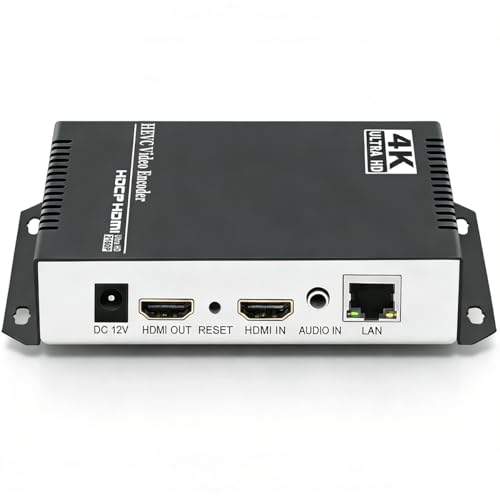
- 4K HDMI input with H.265/H.264 encoding
- Supports numerous streaming protocols
- Up to four simultaneous video outputs
Best For: HDMI-based events needing broad platform compatibility
Best for SDI Workflows
Magewell Ultra Encode SDI Plus

- Standalone 4K SDI encoding
- NDI|HX and multi-destination streaming
- 128 GB internal recording storage
Best For: Professional SDI-based corporate productions
Best Multi-Channel Value
ORIVISION 4-Channel 4K Encoder

- Four HDMI channels with external audio inputs
- Up to two 4Kp30 and two 1080p60 feeds
- Up to 16 simultaneous output feeds
Best For: Multi-source HDMI events and multi-room distribution
Best All-Around HDMI Encoder
Magewell Ultra Encode HDMI Plus

- 4K HDMI input with loop-through monitoring
- Streams and records simultaneously
- Supports RTMP, SRT, NDI|HX, HLS, and more
Best For: Corporate AV teams using HDMI sources and needing flexible streaming plus recording
Best SDI Protocol Flexibility

- Supports H.264/H.265 and extensive IP protocols
- Outputs up to four streams simultaneously
- Adds logos, text, time, and other adjustments
Best For: SDI-based corporate events distributing one feed to multiple destinations
Best 4K60 SDI Encoder
Blackmagic Streaming Encoder 4K
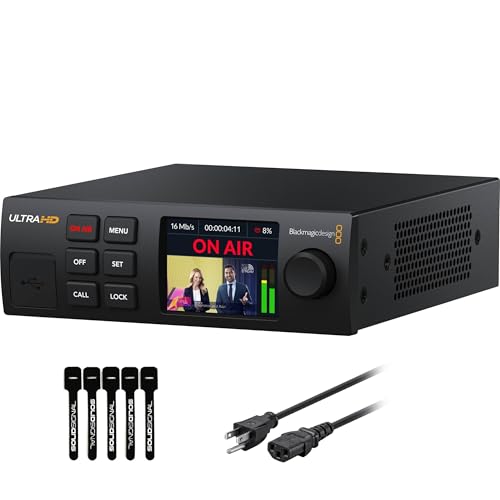
- Streams up to 2160p60 in H.264 or H.265
- 12G-SDI input with standards conversion
- Ethernet and mobile connectivity with auto-failover
Best For: Professional SDI productions needing 4K60 and resilient connectivity
Versatile 1080p Multistreamer

- 1080p output up to 60fps
- Four protocol-based streams simultaneously
- Logo, caption, audio, and image controls
Best For: Corporate HD broadcasts with multistreaming and branding needs
4K Presentation Encoder
H.265 HDMI Streaming Appliance

- 4K output up to 30fps
- Up to 120fps at 2K and below
- Four simultaneous protocol outputs
Best For: High-detail conferences and corporate presentations
Compact Multi-Channel Workhorse

- Dual streams per HDMI input
- Broad protocol compatibility
- Custom branding and image controls
Best For: Compact HD workflows with flexible routing and integration needs
Best All-Around Production Pick – Magewell Ultra Encode AIO
For corporate events needing flexible inputs and polished output, the Magewell Ultra Encode AIO is a versatile choice among streaming encoders for corporate events. It accepts HDMI and SDI, supports 4K encoding, and can stream to multiple destinations while recording.
Best For: Corporate AV teams handling mixed camera sources, branded presentations, and multi-platform event distribution.
Pros:
- Combines HDMI and SDI inputs with picture-in-picture and side-by-side layouts.
- Supports 4K encoding, H.264 or HEVC compression, and up to six simultaneous destinations.
- Streams and records at the same time, with overlays, scheduled captures, and multiple storage options.
- Offers PoE, Wi-Fi, 4G USB modem support, web control, API control, and an LCD display.
Cons:
- Its broad feature set may be more than a simple single-camera event requires.
- SDI 4K support is listed up to 4096×2160p30, while HDMI supports higher frame rates.
The AIO is a strong fit when an event workflow must accommodate different source types, branded graphics, redundancy through recording, and several streaming endpoints in one device.
Best Protocol Flexibility – URayCoder 4K HDMI Encoder
The URayCoder 4K HDMI encoder is aimed at teams that need broad platform and protocol compatibility without adding another streaming appliance. It converts HDMI video to network streams and supports 4K input, multiple outputs, and customizable on-screen branding.
Best For: Corporate events using HDMI sources that need flexible delivery to platforms such as YouTube, Facebook, Twitch, Vimeo, or internal streaming servers.
Pros:
- Supports H.265 and H.264 encoding with 4K input at up to 30fps.
- Handles protocols including RTMP(S), SRT, HLS, RTSP, WebRTC, UDP, RTP, and more.
- Can output up to four video streams with different protocols simultaneously.
- Provides text, scrolling captions, logos, timestamps, cropping, rotation, and audio-source adjustments.
Cons:
- It is an HDMI-only encoder, so SDI sources require conversion.
- The supplied notes do not specify onboard recording capabilities.
This is a practical option for corporate streaming encoders for corporate events when protocol variety and platform reach matter more than integrated production switching or recording.
Best for SDI Workflows – Magewell Ultra Encode SDI Plus
The Magewell Ultra Encode SDI Plus is a compact standalone solution for professional SDI-based event systems. It supports 4K SDI encoding, multi-destination streaming, onboard recording, and NDI|HX integration for corporate production and hybrid workflows.
Best For: Corporate AV and broadcast teams using SDI cameras, switchers, or contribution systems that need reliable streaming and recording in a small chassis.
Pros:
- Encodes SDI video up to 4096×2160p30 using H.264 or H.265.
- Supports RTMP(S), SRT, NDI|HX, HLS, and TS over UDP/RTP for varied workflows.
- Records while streaming to its 128 GB internal storage, USB storage, or network locations.
- Includes PoE, Gigabit Ethernet, Wi-Fi, 4G/5G modem support, web control, API access, and on-device control.
Cons:
- It accepts SDI video only, so HDMI sources need a converter.
- SDI 4K encoding is specified up to 30fps.
For SDI-centered corporate events, the SDI Plus combines contribution flexibility, NDI|HX support, and recording features without requiring a computer-based encoder at the event location.
Best Multi-Channel Value – ORIVISION 4-Channel 4K Encoder
The ORIVISION 4-channel encoder is designed for events that need several HDMI feeds managed from one hardware unit. It supports up to two 4Kp30 inputs alongside two 1080p60 inputs and can distribute channels across multiple platforms and protocols.
Best For: Corporate venues with multiple HDMI sources, parallel presentations, or several live feeds that must reach different destinations.
Pros:
- Provides four HDMI inputs and four external audio input jacks.
- Supports up to two 4Kp30 channels plus two 1080p60 channels.
- Can output as many as 16 feeds across platforms using supported protocols.
- Includes an LCD status screen, OSD overlays, mirror/flip controls, and 24/7 operation support.
Cons:
- It is limited to HDMI inputs rather than offering SDI connectivity.
- The product carries a one-year warranty, shorter than some professional alternatives.
- Its multi-channel configuration may require more setup than a single-feed encoder.
Among streaming encoders for corporate events, this model stands out when channel count and simultaneous distribution are priorities, especially for multi-room or multi-source productions.
Best All-Around HDMI Encoder – Magewell Ultra Encode HDMI Plus
For corporate events built around HDMI cameras, switchers, or presentation sources, the Magewell Ultra Encode HDMI Plus is a versatile choice among streaming encoders for corporate events. It supports up to 4K30 input, simultaneous streaming and recording, and a broad range of delivery protocols.
Best For: Corporate AV teams that need flexible HDMI capture, local loop-through monitoring, branded overlays, and recording during live events.
Pros:
- Supports 4K HDMI encoding with loop-through output for displays or downstream equipment.
- Can stream to multiple destinations using RTMP, RTMPS, SRT, NDI|HX, HLS, and other protocols.
- Records to internal 128GB storage, USB storage, or network locations while streaming.
- Offers overlays, scaling, cropping, PoE, Wi-Fi, and web/API control.
Cons:
- Maximum listed HDMI encoding resolution is 4096×2160p30, not 4K60.
- 4G/5G modem support requires a separately supplied USB modem.
Its combination of HDMI loop-through, recording, overlays, and multi-protocol output makes it a strong fit for repeatable corporate productions where one compact device must handle both streaming and local event workflows.
Best SDI Protocol Flexibility – URayCoder SDI to IP Encoder
The URayCoder SDI to IP Encoder is designed for corporate event systems using SDI cameras and production equipment. It supports H.264 and H.265 workflows, multiple streaming protocols, and up to four simultaneous video streams for distributing one source to different platforms or servers.
Best For: Event teams with SDI-based setups that need multi-destination streaming, customizable overlays, and integration options.
Pros:
- Supports SDI input and multiple protocols, including RTMP(S), SRT, HLS, UDP, RTP, HTTP, and RTSP.
- Can output four video streams simultaneously, with different protocols assigned to each stream.
- Allows text, scrolling text, logos, and time overlays, plus image and audio adjustments.
- Includes SDK, API, CGI documentation, and stated lifetime technical support and warranty.
Cons:
- Uses a single SDI input and does not list HDMI input or loop-through.
- Its Type I three-pin power plug may require attention to regional power compatibility.
For SDI-centric corporate productions, this encoder stands out for protocol variety and simultaneous outputs. It is particularly useful when a single event feed must reach several streaming destinations or internal distribution systems.
Best 4K60 SDI Encoder – Blackmagic Streaming Encoder 4K
The Blackmagic Streaming Encoder 4K is a strong option for corporate productions that require high-resolution SDI input and dependable connectivity. It supports H.264 and H.265 streaming up to 2160p60, standards conversion, Ethernet, and USB-C smartphone tethering with automatic failover.
Best For: Professional corporate events using 12G-SDI sources, 4K60 delivery, mobile backup connectivity, and broadcast-style control features.
Pros:
- Encodes HD and Ultra HD up to 2160p60 using H.264 or H.265.
- 12G-SDI input, loop output, and Teranex standards conversion support varied source and streaming formats.
- Ethernet and USB-C mobile connectivity provide automatic failover between primary and backup connections.
- Includes SDI and HDMI monitor outputs, closed-caption support, REST API control, and USB-C webcam outputs.
Cons:
- Designed around SDI sources rather than HDMI input.
- Advanced camera control, tally, and talkback features depend on compatible Blackmagic Design equipment.
With 4K60 capability, standards conversion, and connection failover, this model is well suited to higher-end corporate events where stream continuity and integration with SDI production systems are priorities.
Versatile 1080p Multistreamer – H.265 HDMI-to-IP Encoder
For corporate events needing dependable HD distribution, this encoder is a practical choice among streaming encoders for corporate events. It accepts an HDMI source, supports H.265, H.264, and MJPEG, and can deliver up to 1080p at 60fps over a broad selection of streaming protocols.
Best For: Corporate presentations, meetings, and branded live streams that need flexible protocol support and simultaneous platform delivery.
Pros:
- Supports 1080p input and output at up to 60fps.
- Can output four streams using different protocols, including RTMP(S), RTSP, HLS, UDP, and SRT.
- Offers branding and production controls such as logos, scrolling captions, timestamps, cropping, and mirroring.
- Includes HDMI or 3.5mm line-in audio, browser-based status viewing, and lifetime technical support.
Cons:
- It is limited to HDMI input and does not provide 4K support.
- The listing does not specify a current software-update date.
This URayCoder model is well suited to teams that value configuration flexibility over maximum resolution. Its 1080p/60 capability, multistream output, and customization options make it useful for polished corporate broadcasts without requiring a separate streaming appliance for each platform.
4K Presentation Encoder – H.265 HDMI Streaming Appliance
When a corporate event depends on sharp presentation footage or 4K camera output, this model stands out among streaming encoders for corporate events. It supports 4K input and output at up to 30fps, while lower resolutions can reach up to 120fps for smoother motion.
Best For: 4K corporate conferences, product demonstrations, executive presentations, and high-detail event broadcasts.
Pros:
- Supports 3840×2160 4K input and output at up to 30fps.
- Supports up to 120fps at 2K and lower resolutions.
- Can produce four simultaneous streams across protocols such as RTMP(S), SRT, HLS, WebRTC, and multicast.
- Includes text, logo, timestamp, cropping, rotation, audio, and bitrate controls.
Cons:
- 4K operation is limited to 30fps.
- It accepts HDMI sources only, so additional conversion may be needed for other inputs.
This is the strongest fit of the three for teams prioritizing 4K detail. Its broad protocol selection and multistream capability also support complex event workflows, while the included customization tools can help maintain consistent corporate branding on the live output.
Compact Multi-Channel Workhorse – 1080p HDMI Streaming Encoder
For event teams building repeatable HD workflows, this compact unit is a practical option among streaming encoders for corporate events. It converts HDMI video to streaming URLs, supports multiple protocols, and provides dual stream output for each HDMI input.
Best For: Corporate broadcast setups that need flexible routing, compact hardware, and simultaneous delivery to different streaming servers.
Pros:
- Supports dual video streams per HDMI input, with different protocols for each stream.
- Works with RTMPS, RTSP, SRT, HLS, UDP, RTP, MP4, FLV, and other listed protocols.
- Allows resolution, frame-rate, bitrate, audio, text, logo, timestamp, crop, rotate, flip, and mirror adjustments.
- Includes a matte aluminum shell plus lifetime warranty and technical support.
Cons:
- The supplied details specify 1080p HD rather than 4K output.
- Its HDMI-based design may require adapters for non-HDMI event sources.
The UHE265-8 emphasizes workflow flexibility and physical compactness. Dual-stream output is useful when an event needs different destinations or bandwidth profiles, while SDK, API, and CGI documentation may appeal to organizations planning custom control or integration.
How We Picked the Best Streaming Encoders for Corporate Events
We focused on features that matter in business productions rather than headline resolution alone. The selection includes dedicated HDMI and SDI encoders, all-in-one models, multi-channel units, and hardware designed for direct delivery to streaming platforms or managed IP video systems.
We considered input compatibility, supported protocols, encoding formats, output flexibility, recording capability, monitoring and loop-through options, network connectivity, power requirements, and suitability for repeatable event workflows. Models supporting options such as RTMP, RTMPS, SRT, RTSP, HLS, NDI, or UDP can serve very different production and distribution needs, so protocol breadth was treated as a practical advantage—not a guarantee of better results in every setup.
Quick Comparison
- Best for flexible production: An all-in-one encoder with HDMI and SDI support, local recording, and multiple input options.
- Best for SDI systems: A standalone SDI encoder with professional signal support, PoE, and reliable network streaming.
- Best for HDMI installations: An encoder with loop-through, 4K support, and straightforward integration with presentation systems.
- Best for multi-source distribution: A multi-channel unit capable of handling several feeds or outputs.
- Best for portable webcasts: A compact encoder with simple Ethernet connectivity and support for common streaming protocols.
Key Buying Factors for Streaming Encoders for Corporate Events
Inputs and Signal Compatibility
Match the encoder to the cameras, switchers, presentation systems, and capture outputs used at your venue. HDMI is common for laptops and consumer or prosumer cameras, while SDI is generally better for longer cable runs and installed broadcast-style systems. Check the exact supported resolution, frame rate, connector type, and whether embedded or external audio is required.
Protocols and Platform Support
RTMPS is widely used for secure delivery to online platforms, while SRT can be valuable when the contribution path is unpredictable. RTSP, HLS, UDP, and NDI may be more useful for internal distribution, monitoring, digital signage, or a private production network. Verify that the encoder supports the protocol and authentication method required by your event platform.
Reliability and Operations
Corporate events often prioritize stable, repeatable operation over maximum bitrate. Look for status monitoring, clear configuration tools, recording or backup capabilities, redundant network options where available, and a design that can be tested before the event. PoE may simplify installations, while local recording can provide a valuable fallback or archive.
Resolution, Bitrate, and Network Capacity
4K support is useful when the source, platform, and audience infrastructure can take advantage of it, but HD may be the more efficient choice for bandwidth-limited venues. Confirm encoder bitrate ranges, network throughput, and whether the venue can provide stable wired Ethernet rather than relying on congested Wi-Fi.
Who Should Buy Which Streaming Encoders for Corporate Events?
Choose an all-in-one model if your team needs flexible inputs, recording, and production-oriented features in one device. Pick an SDI-focused encoder for professional camera chains, long cable runs, or permanent AV installations. An HDMI model with loop-through is a practical fit for boardrooms, conference rooms, and presentation-heavy events.
Organizations distributing several sources should consider a multi-channel encoder, provided its total processing capacity and output limits match the workflow. For smaller teams and occasional webcasts, a compact HD unit may be easier to configure and support. Before buying, confirm platform compatibility, audio handling, power requirements, and the encoder’s management workflow with the person who will operate it on event day.