
Adding Bluetooth to a Windows desktop or upgrading an unreliable built-in connection can be as simple as plugging in a USB adapter. The right dongle lets you connect headphones, keyboards, mice, controllers, speakers, and other wireless accessories without installing an expansion card.
We selected 10 Bluetooth adapters for Windows across current Bluetooth versions, compact designs, low-cost options, and long-range models. Use the buying guide below to match the adapter’s compatibility, range, and features to your PC and accessories.
Best 10 Bluetooth Adapters for Windows Picks for 2026
Best Overall
TP-Link Bluetooth 5.4 Nano Adapter

- Bluetooth 5.4 with EDR and BLE
- Tiny 2-gram nano design
- Supports Windows 8.1, 10, 11, and 7
Best For: Compact, broadly compatible Windows Bluetooth upgrades
Best for Multi-Device Pairing
Avantree DG45 Bluetooth Adapter

- Pairs with up to seven Bluetooth devices
- Supports audio streaming and headset calls
- Works with Windows 8 through 11
Best For: Users connecting multiple Bluetooth peripherals to a Windows PC
Best Plug-and-Play Pick
UGREEN Bluetooth 5.3 USB Adapter

- Bluetooth 5.3 BR+EDR connectivity
- Connects up to five devices
- Driver-free setup on Windows 8.1/10/11
Best For: Simple Bluetooth expansion for modern Windows PCs
Best for Windows and Linux
Cudy BU530 Bluetooth 5.3 Adapter

- Supports Windows and Linux
- Compact 2-gram nano design
- Bluetooth 5.3 with backward compatibility
Best For: Mixed Windows/Linux setups needing a small USB-A adapter
Best Compact Option
Plugable USB Bluetooth 4.0 Micro Adapter

- Tiny design for portable use
- Supports Windows 7, 8, 10, and 11
- Connects common audio and input devices
Best For: Windows laptops and PCs needing a low-profile adapter
Best for Multiple Devices
Amazon Basics Bluetooth 5.4 USB Adapter
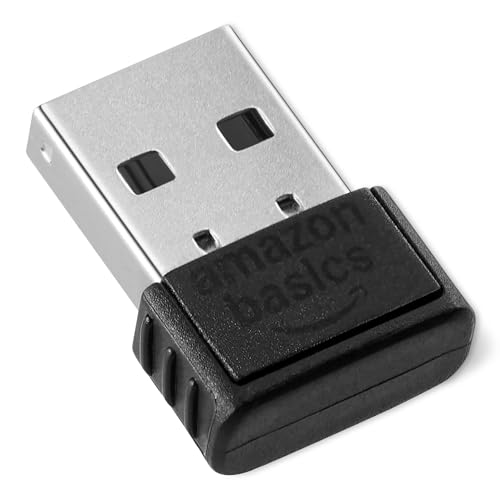
- Connects up to six devices simultaneously
- Bluetooth 5.4 with backward compatibility
- Nano receiver for standard USB ports
Best For: Supported Windows PCs pairing several Bluetooth peripherals
Best with Extra Features
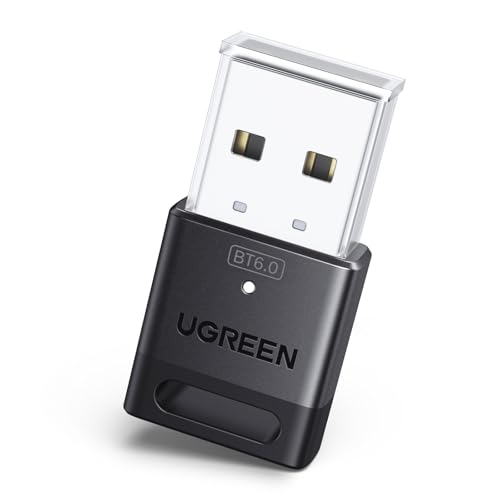
- Bluetooth 6.0 with EDR and BLE
- Connects up to five devices
- Plug and play on Windows 11/10/8.1
Best For: Windows users wanting modern, compact multi-device connectivity
Best Heavy-Duty Pick

- Class 1 radio with 5dBi antenna
- Up to 600 feet in open areas
- Connects up to seven devices
Best For: Windows setups needing extended Bluetooth range
Best Budget Nano Option
TP-Link UB400 Bluetooth 4.0 Dongle

- Ultra-small nano USB design
- Supports Windows 11 through XP
- Up to 65 feet of transmission range
Best For: Older or compact Windows PCs needing basic Bluetooth
Best Overall – TP-Link Bluetooth 5.4 Nano Adapter
For shoppers comparing Bluetooth adapters for Windows, the TP-Link UB500 stands out with Bluetooth 5.4, EDR, BLE support, and a tiny design that can remain in a USB port. It supports Windows 8.1, 10, and 11 with plug-and-play setup, while Windows 7 requires a downloadable driver.
Best For: Windows users who want a compact adapter with broad backward compatibility and support for peripherals, phones, printers, and headsets.
Pros:
- Bluetooth 5.4 with backward compatibility from Bluetooth 5.3 through 1.1.
- Nano-sized design weighs just 2 grams and can stay connected while traveling.
- Supports EDR and BLE for faster transfers and lower-power connectivity.
- Works with Windows 8.1/10/11 without a manual driver installation.
Cons:
- Windows 7 requires a driver download.
- Not compatible with macOS, Linux, TVs, Windows 8, or direct console use.
- An existing internal Bluetooth adapter should be disabled to avoid driver conflicts.
The UB500 is a flexible choice for adding Bluetooth to a Windows desktop or laptop, especially when a nearly flush, low-profile adapter is important. Confirm your Windows version and disable built-in Bluetooth if setup issues occur.
Best for Multi-Device Pairing – Avantree DG45 Bluetooth Adapter
The Avantree DG45 is a focused option for Bluetooth adapters for Windows PCs and laptops. It supports Windows 8, 8.1, 10, and 11, and can pair with up to seven Bluetooth devices, including headphones, speakers, keyboards, mice, printers, and supported controllers.
Best For: Windows users who need to connect several Bluetooth peripherals and occasionally stream audio or make calls through a Bluetooth headset.
Pros:
- Can pair with up to seven Bluetooth devices.
- Supports stereo audio streaming and headset microphones for calls.
- Compatible with a range of Bluetooth peripherals and supported game controllers.
- Compact 2-gram design is easy to leave plugged into a laptop or desktop.
Cons:
- Only one Bluetooth audio device can be active at a time.
- Does not work with Wi-Fi or 2.4G wireless devices that use proprietary USB receivers.
- Not compatible with macOS, ChromeOS, Linux, Windows 7, TVs, car stereos, or consoles.
The DG45 makes sense when your priority is connecting several Bluetooth accessories rather than supporting other wireless standards. Its Windows-only compatibility and clear distinction between Bluetooth and 2.4G devices are important before buying.
Best Plug-and-Play Pick – UGREEN Bluetooth 5.3 USB Adapter
The UGREEN Bluetooth 5.3 adapter is a straightforward choice among Bluetooth adapters for Windows. It offers plug-and-play operation on Windows 8.1, 10, and 11, supports up to five connected devices, and uses a compact form that is designed to remain in a laptop or desktop USB port.
Best For: Windows 8.1/10/11 users who want simple setup for a mouse, keyboard, phone, headphones, speakers, or printer.
Pros:
- Bluetooth 5.3 BR+EDR is designed to improve connection stability and power efficiency.
- Supports up to five connected Bluetooth devices.
- No driver installation is required on Windows 8.1, 10, and 11.
- Compact design minimizes interference with nearby USB ports.
Cons:
- Not compatible with Windows 7, Linux, macOS, TVs, or cars.
- It cannot be used directly with PS3, PS4, PS5, Switch, or Xbox consoles.
- Only one Bluetooth audio device of the same type can play music at a time.
UGREEN keeps the setup simple for supported Windows systems and provides enough capacity for a typical set of Bluetooth accessories. Buyers should note that it is a receiver for PC connectivity, not a general-purpose transmitter or console adapter.
Best for Windows and Linux – Cudy BU530 Bluetooth 5.3 Adapter
The Cudy BU530 is a useful alternative for shoppers seeking Bluetooth adapters for Windows with Linux support. Its Bluetooth 5.3 connection, USB-A interface, and nano-sized body suit desktops and laptops, while Windows 10/11 can install drivers automatically and Windows 7, 8.1, and Linux have manual driver support.
Best For: Users who need one compact Bluetooth adapter for supported Windows systems and Linux computers.
Pros:
- Supports Windows 11/10/8.1/7 and Linux with available drivers.
- Bluetooth 5.3 supports backward compatibility with Bluetooth 4.x, 3.x, and 2.x devices.
- Nano 20 x 15 x 8 mm design weighs about 2 grams.
- Supports headphones, speakers, keyboards, mice, controllers, and IoT sensors.
Cons:
- Windows 7, Windows 8.1, and Linux require manual driver installation.
- Uses a USB-A port, which may require an adapter on some newer laptops.
- The supplied notes do not indicate support for macOS, TVs, or consoles.
The BU530 is the most versatile choice here for households using both Windows and Linux. Its low-profile build is convenient for portable systems, while manual driver availability gives older supported operating systems a path to compatibility.
Best Long-Range Pick – TP-Link UB500 Plus Bluetooth 5.3 Adapter
For shoppers comparing bluetooth adapters for windows, the TP-Link UB500 Plus stands out when adjustable reception and newer Bluetooth support matter. Its USB design adds Bluetooth to compatible Windows desktops and laptops, while the external antenna can be rotated for positioning.
Best For: Windows users who want a long-range adapter with an adjustable antenna.
Pros:
- Bluetooth 5.3 with backward compatibility through Bluetooth 1.1
- Adjustable multi-direction antenna for improved reception positioning
- Supports Windows 11, 10, 8.1, and 7
- Supports enhanced data rate and Bluetooth Low Energy technology
Cons:
- Windows 7 requires a separate driver download
- Larger than a nano-style adapter because of its antenna
The UB500 Plus is a practical choice for a desktop setup or any installation where reception flexibility is more important than the smallest possible dongle. Windows 8.1, 10, and 11 users can use plug-and-play installation when connected to the internet.
Best Compact Option – Plugable USB Bluetooth 4.0 Micro Adapter
The Plugable USB Bluetooth 4.0 Low Energy Micro Adapter is a straightforward choice among bluetooth adapters for windows. Its tiny design can remain connected to a laptop during travel, and it supports common peripherals such as headphones, speakers, keyboards, mice, and phones.
Best For: Windows users who prioritize a small, unobtrusive Bluetooth dongle.
Pros:
- Compact micro adapter designed to stay plugged in while moving
- Supports Windows 11, 10, 8, and 7
- Works with headphones, speakers, headsets, keyboards, mice, and phones
- Includes two-year coverage and lifetime support
Cons:
- Not compatible with Mac computers, TVs, or car stereos
- Windows 7 may require special drivers for some devices
- Does not add Bluetooth 4.0 support to Windows 7
This adapter makes sense for a personal Windows computer that lacks built-in Bluetooth and needs a low-profile solution. Check the operating system and device requirements carefully, especially when using Windows 7 or employer-provided hardware.
Best for Multiple Devices – Amazon Basics Bluetooth 5.4 USB Adapter
The Amazon Basics Bluetooth 5.4 USB Adapter is a simple option for bluetooth adapters for windows, especially if you want to connect several peripherals at once. The nano receiver supports up to six simultaneous devices and uses a standard USB port.
Best For: Windows 8.1, 10, and 11 users connecting multiple Bluetooth peripherals.
Pros:
- Bluetooth 5.4 with broad backward compatibility
- Supports up to six connected devices simultaneously
- Nano design fits a standard USB port
- EDR and BLE support help provide faster transfer and lower energy use
Cons:
- Works only with Windows 8.1, 10, and 11
- Not compatible with Windows 7, Mac, Linux, Chrome, Unix, or PlayStation
- Built-in Bluetooth must be disabled before use
Choose this dongle if your computer runs a supported Windows version and you need one adapter for a mouse, keyboard, and other compatible devices. Its operating-system restrictions make compatibility checking essential before purchase.
Best with Extra Features – UGREEN Bluetooth 6.0 Adapter
The UGREEN USB Bluetooth Adapter is a practical choice for Windows users who want current Bluetooth 6.0 connectivity in a compact dongle. It supports up to five connected devices and works with Windows 11, 10, and 8.1 without driver installation, making it a straightforward option among Bluetooth adapters for Windows.
Best For: Windows desktops and laptops connecting headphones, keyboards, mice, phones, speakers, or printers.
Pros:
- Bluetooth 6.0 with EDR and Bluetooth Low Energy support.
- Can connect up to five Bluetooth devices simultaneously.
- Plug-and-play setup on Windows 11, 10, and 8.1.
- Compact 5-gram design.
Cons:
- Does not support Windows 7, macOS, Linux, TVs, cars, or gaming consoles directly.
- Only one audio device of the same type can play music at a time.
- Existing Bluetooth devices may need to be disabled in Device Manager.
Choose this adapter if you want newer Bluetooth support and dependable multi-device connectivity without installing drivers on a supported Windows PC. Its limitations are mainly compatibility-related, so check your operating system before buying.
Best Heavy-Duty Pick – Techkey Bluetooth 6.0 Adapter
The Techkey USB Bluetooth 6.0 Adapter stands out for its Class 1 radio and external 5dBi antenna, offering a stated range of up to 600 feet in open areas. It is a strong choice for Windows users who need extended reach, fast transfers, and connections to several peripherals from one adapter.
Best For: Windows desktops or laptops that need longer-range connections to headphones, speakers, keyboards, mice, headsets, or printers.
Pros:
- Class 1 Bluetooth 6.0 design with an extended 5dBi antenna.
- Up to 600 feet of range in open areas, subject to interference and obstructions.
- Supports transfer speeds up to 3 Mbps with EDR and BLE.
- Supports up to seven connected Bluetooth devices.
Cons:
- Compatible only with Windows 11, 10, and 8.1.
- Not compatible with macOS, Linux, TVs, car stereos, Xbox, or PS4.
- Actual range can be reduced by walls and wireless interference.
This is the most suitable option here when distance and device capacity matter. The large open-area range claim should not be treated as an indoor guarantee, but the external antenna and seven-device support give it a clear advantage for demanding Windows setups.
Best Budget Nano Option – TP-Link UB400 Bluetooth 4.0 Dongle
The TP-Link UB400 is a small, established Bluetooth 4.0 dongle for adding wireless connectivity to Windows PCs and laptops. Its nano-sized design can remain in a USB port, while support for Windows 11 through XP makes it a flexible pick for older systems among Bluetooth adapters for Windows.
Best For: Windows users who want an unobtrusive adapter for keyboards, mice, headsets, phones, printers, or PC controller use.
Pros:
- Nano-sized design is convenient for travel or permanent use.
- Supports Windows 11, 10, 8.1, 8, 7, and XP.
- Plug and play on newer supported Windows versions.
- Offers a stated transmission distance of up to 65 feet.
Cons:
- Older Bluetooth 4.0 technology compared with newer Bluetooth 6.0 adapters.
- Windows 7 and XP require a downloaded driver.
- Not compatible with macOS, Linux, TVs, or direct console use.
The UB400 is a sensible low-profile choice for basic Bluetooth connectivity, especially if you need compatibility with an older Windows PC. Select a newer adapter instead if you prioritize the latest Bluetooth standard or a larger multi-device capacity.
How We Picked the Best Bluetooth Adapters for Windows
We focused on adapters designed for Windows PCs and laptops, considering Bluetooth version, advertised range, USB format, operating-system support, driver requirements, and overall practicality. We also included a mix of compact nano dongles, standard USB receivers, legacy Bluetooth 4.0 models, and newer Bluetooth 5.3, 5.4, and 6.0 options.
Bluetooth version matters, but it does not guarantee better performance with every device. Your headphones, controller, keyboard, or other accessory must support the relevant features, and the computer’s USB port, drivers, and surrounding wireless interference can affect results.
Quick Comparison
For most modern Windows systems, a Bluetooth 5.3 or 5.4 adapter is the sensible starting point because it offers current compatibility without requiring a premium price. Choose a nano adapter when portability and a clean laptop profile matter most. A full-size dongle or external-antenna model is usually better for a desktop tucked under a desk or for connections that need more range.
Bluetooth 4.0 adapters remain useful for basic mice, keyboards, and older accessories, especially when cost is the main concern. However, they are less compelling for new purchases if you want the broadest support for current devices.
Key Buying Factors for Bluetooth Adapters for Windows
Compatibility and Drivers
Check the listed Windows versions before buying. Some adapters are closer to plug-and-play than others, while certain models may require a manufacturer driver. Disable or check your PC’s existing Bluetooth hardware if Windows creates a conflict after installation.
Bluetooth Version and Profiles
A newer Bluetooth specification can improve efficiency and compatibility, but the connected accessory determines which capabilities are available. For headphones, verify support for the profiles and audio features your headset uses. For input devices, reliable pairing and low power use are often more important than headline version numbers.
Range and Antenna Design
Advertised range is measured under favorable conditions. Walls, metal cases, USB 3.x interference, and nearby Wi-Fi equipment can reduce it. Desktop users seeking a stronger connection should consider a long-range adapter, an external antenna, or a short USB extension cable that moves the dongle away from the computer chassis.
Size and USB Connection
Nano adapters are discreet and convenient for laptops, while larger receivers can be easier to reposition and may provide better wireless performance. Confirm whether your computer has USB-A, USB-C, or requires an adapter. Also check that the dongle will not block neighboring ports.
Who Should Buy Which Bluetooth Adapters for Windows?
- For everyday Windows accessories: Choose a current Bluetooth 5.3 or 5.4 USB adapter for a balanced combination of compatibility, efficiency, and value.
- For laptops and travel: A nano dongle is the least obtrusive choice and works well when you want to leave the adapter connected.
- For desktops and difficult signal paths: Pick a long-range model or one with an external antenna, particularly when the PC sits under a desk or far from your headphones or controller.
- For basic older peripherals: A Bluetooth 4.0 adapter can be adequate for simple mice and keyboards, provided it supports your Windows version.
- For buyers wanting the newest standard: A Bluetooth 6.0 option may offer added future-proofing, but confirm accessory compatibility and driver support before paying extra.
Before ordering, identify your Windows version, available USB ports, the devices you plan to connect, and the distance between them. Those details matter more than choosing the adapter with the highest Bluetooth number alone.