
The best smart home hubs bring your devices, protocols, and automations together so your home is easier to control and more reliable day to day.
This roundup compares 10 smart home hubs, from simple Alexa control panels to powerful multi-protocol controllers for advanced setups.
Best 10 Smart Home Hubs Picks for 2026
Best Overall Smart Home Hub

- Matter, Zigbee, and Z-Wave support
- SmartThings, Alexa, and Google Home compatible
- Ethernet or Wi-Fi connectivity
Best For: Mixed-brand smart homes and advanced routines
Best Display Hub
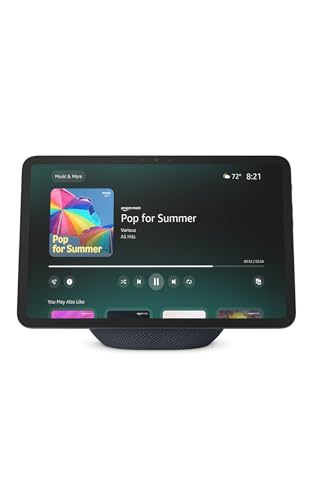
- 11-inch Full-HD touchscreen
- Built-in hub for Alexa-compatible devices
- Camera feeds, routines, and video calls
Best For: Alexa users who want visual smart home control
Best for Local Automation

- Home Assistant OS preinstalled
- Keeps home data on the hub
- Expandable with Z-Wave, Zigbee, and Thread USB devices
Best For: Privacy-focused users and advanced automation
Best Wall-Mounted Control Panel

- Customizable 8-inch smart home dashboard
- Built-in Zigbee, Matter, and Thread support
- Designed for cameras, routines, and security controls
Best For: Families wanting shared Alexa home control
Best Local-First Hub

- Local automation continues during internet outages
- Supports Matter, Z-Wave, Zigbee, and Bluetooth
- Advanced routines with no subscription required
Best For: DIY users building complex, reliable automations
Best Camera-Centered Hub

- Supports up to 16 Tapo cameras and 64 sensors
- Local storage with support for drives up to 16TB
- Includes AI alerts, HDMI viewing, and a 110dB alarm
Best For: Tapo security systems needing centralized local recording
Best Touchscreen Security Hub
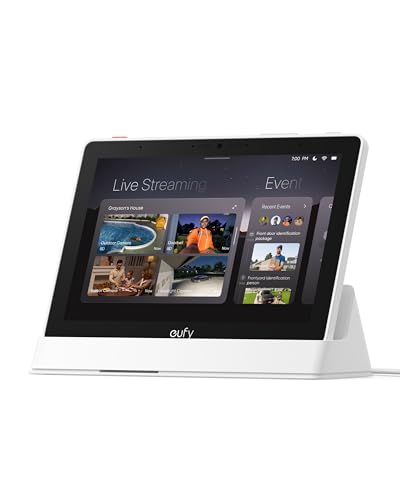
- Displays four camera feeds simultaneously
- Provides automatic event alerts and local playback
- Accessible 8-inch touchscreen for household monitoring
Best For: Families wanting an easy-to-use security control screen
Best IR Universal Remote Hub

- Controls 8,000+ IR brands and 18 appliance types
- Matter, voice, app, schedule, and GPS control
- Built-in 93 dB alarm for Tapo sensor alerts
Best For: Replacing multiple remotes while automating legacy appliances
Best Touchscreen Alexa Controller
- 8-inch dashboard for devices, cameras, and routines
- Built-in Zigbee, Matter, Thread, and other connectivity
- Wall-mountable and compatible with thousands of Alexa devices
Best For: Alexa homes that want a visual control panel
Best Multi-Protocol Automation Hub

- Supports seven technologies, including Z-Wave, Matter, and Thread
- Compatible with 50,000+ devices from 1,000+ brands
- Local-first processing with powerful Homey Flow automations
Best For: Large, mixed-brand smart homes needing advanced local automation
Best Overall Smart Home Hub – Aeotec Smart Home Hub
The Aeotec Smart Home Hub is a strong choice for shoppers seeking versatile smart home hubs with broad device compatibility. It supports Matter, Z-Wave Plus, Zigbee, and Wi-Fi, while offering app and voice control through SmartThings, Alexa, and Google Home.
Best For: Households building a mixed-brand smart home with connected lighting, sensors, switches, and automation routines.
Pros:
- Supports Matter, Z-Wave Plus, Zigbee, and Wi-Fi devices.
- Works with Alexa, Google Home, and the SmartThings app.
- Offers wired Ethernet or Wi-Fi setup and supports local automations.
Cons:
- Z-Wave Plus compatibility is specified for the V3 model.
- Designed for use in North America.
Choose this hub if flexibility and cross-platform compatibility matter more than having a built-in display. Its Ethernet option and local automation support can also help create a responsive, dependable setup.
Best Display Hub – Amazon Echo Show 11
The Amazon Echo Show 11 combines a smart home hub with an 11-inch Full-HD touchscreen and spatial audio. For buyers comparing smart home hubs, it offers a visual way to manage compatible devices, view cameras, and use Alexa without adding a separate hub.
Best For: Alexa households that want a prominent touchscreen for smart home controls, video calls, entertainment, recipes, and calendars.
Pros:
- Built-in smart home hub controls thousands of compatible devices.
- 11-inch Full-HD display provides more viewing area than the Echo Show 8 (2025 release).
- Supports camera viewing, routines, video calls, and voice control.
- Includes microphone and camera privacy controls.
Cons:
- Its feature set is centered on Alexa-compatible devices.
- Some Alexa+ and Ring features require compatible subscriptions or services.
This is a good fit when a hub should also serve as a household information and entertainment screen. It is less focused on local or platform-neutral automation than dedicated hub hardware.
Best for Local Automation – Home Assistant Green
Home Assistant Green | Smart Home hub with Advanced Automation | Official Home Assistant Hardware
Check Price On AmazonHome Assistant Green is a compact option for shoppers who want powerful, locally managed smart home hubs. Home Assistant OS comes preinstalled, and the device is designed to keep home data on the hub while supporting extensive automation and future expansion.
Best For: Privacy-conscious users and enthusiasts who want centralized automation across many smart home devices.
Pros:
- Home Assistant is preinstalled for straightforward setup.
- Runs automations locally and keeps home data on the device.
- Compact, fanless, and power efficient design.
- USB ports allow expansion with Z-Wave, Zigbee, and Thread adapters.
Cons:
- Requires Ethernet rather than built-in Wi-Fi connectivity.
- Z-Wave, Zigbee, and Thread connectivity requires compatible USB devices.
Home Assistant Green is compelling for buyers willing to invest in a flexible automation platform. Its local data approach and USB expandability make it a particularly adaptable foundation as a system grows.
Best Wall-Mounted Control Panel – Amazon Echo Hub
The Amazon Echo Hub is a dedicated 8-inch control panel for Alexa smart homes. Among smart home hubs, it stands out for its customizable dashboard, allowing households to organize device controls, cameras, routines, and security functions in one visible location.
Best For: Families that want a shared, wall-mounted interface for Alexa-compatible lights, cameras, locks, alarms, and sensors.
Pros:
- Customizable dashboard with rearrangeable sections and resizable controls.
- Built-in hub supports Wi-Fi, Bluetooth, Zigbee, Matter, Sidewalk, and Thread devices.
- Can display cameras, activate routines, and manage compatible security systems.
- Supports wall mounting and optional tabletop use.
Cons:
- Wall-mount cable pass-through and power-over-Ethernet accessories are sold separately.
- Tabletop stand is sold separately.
- Its smart home experience is primarily built around Alexa-compatible devices.
Consider the Echo Hub when quick, glanceable control is more important than a general-purpose smart display. The dedicated dashboard can make shared household control simpler, especially in homes with many Alexa-compatible devices.
Best Local-First Hub – Hubitat Elevation C-8 Pro
For shoppers comparing smart home hubs, the Hubitat Elevation C-8 Pro is a strong fit for complex automations, broad device compatibility, and reliable local control. It supports Matter, Z-Wave, Zigbee, and Bluetooth, while processing automations on the hub so routines can continue during internet outages.
Best For: DIY smart-home builders who want advanced, subscription-free automations and wide protocol support.
Pros:
- Local processing keeps automations responsive and functional during internet outages.
- Supports Matter 1.5, Z-Wave 800 Series Long Range, Zigbee 3.0, and Bluetooth.
- Works with Alexa, Google Home, and Apple HomeKit, with compatibility across 1,000+ devices and 100+ brands.
- Rule Machine and the AI-assisted routine builder support detailed multi-condition routines without requiring programming.
Cons:
- Its advanced rule engine and community-driven customization may have a steeper learning curve than simpler hubs.
- It is primarily an automation hub rather than a dedicated touchscreen control panel.
The C-8 Pro stands out when reliability, privacy, and flexibility matter more than a simplified interface. Its external antennas and multi-protocol design make it especially practical for larger or device-dense homes.
Best Camera-Centered Hub – Tapo H500 CentralHub
The Tapo H500 is one of the more specialized smart home hubs, built around Tapo cameras, sensors, and doorbells. It combines local video storage, camera monitoring, AI-assisted alerts, and device management in a single unit, making it particularly useful for a Tapo-focused security setup.
Best For: Tapo users who want centralized camera recording, local storage, and security-focused monitoring.
Pros:
- Connects up to 16 Tapo cameras and 64 Tapo Sub-G sensors, with continuous recording for up to four cameras.
- Includes 16GB of storage and supports an added 2.5-inch SATA HDD or SSD up to 16TB.
- Local recording avoids separate microSD cards for each camera and remains accessible during network outages.
- Offers familiar-face filtering, four-view HDMI monitoring, a 110dB alarm, and two-way audio.
Cons:
- Its strongest features are centered on Tapo cameras, sensors, and doorbells rather than broad third-party smart-home compatibility.
- Additional storage requires a separately purchased drive.
- Continuous recording is limited to four cameras.
The H500 makes the most sense as a local security hub rather than a general-purpose automation controller. Its expandable storage and HDMI output are useful for households that want a consolidated view of their Tapo surveillance system.
Best Touchscreen Security Hub – eufy Smart Display E10
The eufy Smart Display E10 gives smart home hubs a more hands-on format with an 8-inch touchscreen for monitoring cameras, doorbells, and other security events. It can show four live feeds at once, surface recorded events from local storage, and provide alerts when someone rings the doorbell or a camera detects activity.
Best For: Families and security-focused households that want an accessible, always-available monitoring screen.
Pros:
- Automatically displays live video and voice alerts for doorbell, door, and camera events.
- Shows four simultaneous live feeds for broad property monitoring.
- Stores historical events locally for quick playback without waiting for cloud loading.
- Its touchscreen interface is designed to be easy for children and seniors to use, with daily summaries powered by facial and package recognition.
Cons:
- It is focused primarily on eufy security monitoring rather than broad smart-device automation.
- The 8-inch display requires a dedicated location and power or charging setup.
- Its listed dimensions and 2.46-pound weight make it less compact than a hub designed to sit unobtrusively near a router.
The E10 is a practical choice when visibility and ease of use are priorities. Rather than hiding the hub away, it puts security feeds and event summaries where household members can see and use them quickly.
Best IR Universal Remote Hub – Tapo H110
The Tapo H110 is a practical choice for shoppers seeking smart home hubs that can bring older infrared appliances and newer IoT devices into one control system. It supports more than 8,000 IR brands, Matter integration, app and voice control, schedules, and location-based automations.
Best For: Homes that want to replace multiple remotes while adding basic automation and sensor alerts.
Pros:
- Controls TVs, air conditioners, fans, projectors, and other devices across 18 appliance types.
- Supports Alexa, Google Assistant, Siri through Matter, and the Tapo app.
- Built-in 93 dB alarm can provide audible alerts when paired with compatible Tapo sensors.
- Schedules and GPS-based routines can automate connected appliances.
Cons:
- IR control requires compatible appliances to be within range.
- Operates on 2.4 GHz Wi-Fi and requires corded power.
- Its broad device control is centered on Tapo’s ecosystem and supported integrations.
The H110 stands out among smart home hubs for its combination of universal IR control and Matter support. It is especially useful when legacy electronics are as important as newer connected devices.
Best Touchscreen Alexa Controller – Amazon Echo Hub
The like-new Amazon Echo Hub is a wall-mountable control panel for shoppers who prefer visual smart home hubs. Its 8-inch display provides quick access to lights, plugs, cameras, routines, and security devices, while built-in support covers Wi-Fi, Bluetooth, Zigbee, Matter, Sidewalk, and Thread devices.
Best For: Alexa households that want a centralized touchscreen dashboard for everyday control and home security.
Pros:
- 8-inch display offers customizable controls and widgets for devices, cameras, and routines.
- Built-in hub supports Wi-Fi, Bluetooth, Zigbee, Matter, Sidewalk, and Thread devices.
- Works with thousands of compatible locks, thermostats, speakers, cameras, and sensors.
- Can be wall mounted and includes privacy controls such as a microphone-off button.
Cons:
- Wall cable pass-through, power-over-Ethernet adapter, and tabletop stand are sold separately.
- This is a like-new refurbished device, so packaging may be generic Amazon-branded.
- Its controls are designed around Alexa-compatible devices and services.
The Echo Hub is a strong fit when a dedicated visual interface matters more than a compact, screen-free controller. Its refurbished status can make it appealing for Alexa users seeking a lower-cost way to add a central dashboard.
Best Multi-Protocol Automation Hub – Homey Pro (2026)
Homey Pro (2026) is designed for shoppers comparing smart home hubs that can unify a large, mixed-brand setup. It combines seven connectivity technologies, supports more than 50,000 devices from over 1,000 brands, and processes automations locally through the Homey Flow platform.
Best For: Advanced smart homes with devices spread across multiple brands and protocols.
Pros:
- Combines Wi-Fi, Zigbee, Z-Wave Plus, infrared, BLE, Matter, and Thread in one hub.
- Supports more than 50,000 devices from over 1,000 brands.
- Local-first processing keeps data on the hub and reduces cloud dependency.
- Homey Flow and Advanced Flow support detailed routines, alerts, and energy automation.
Cons:
- The broad feature set may be more than casual users need.
- Compatibility can depend on official or community-built Homey apps.
- Its wall-mount design and metal construction may require more deliberate placement than a small plug-in hub.
Homey Pro is the most flexible option in this group for protocol diversity and complex automations. It makes the most sense for users who want local control, detailed flows, and room to expand their smart home over time.
How We Picked the Best Smart Home Hubs
We focused on compatibility, automation capability, setup requirements, control options, and long-term usefulness. The lineup includes hubs supporting standards such as Matter, Thread, Zigbee, and Z-Wave, along with display-based controllers and security-focused options.
We also considered whether each hub is best suited to beginners, users already invested in a particular ecosystem, or enthusiasts who want local control and complex routines. A strong hub should make devices easier to manage rather than add another confusing layer to your home.
Quick Comparison
| Best For | Look For |
|---|---|
| Simple voice and display control | Alexa integration, touchscreen controls, and broad device compatibility |
| Advanced local automation | Local processing, flexible rules, and support for multiple protocols |
| Mixed-brand smart homes | Matter, Zigbee, Z-Wave, Thread, Wi-Fi, or broad bridge support |
| Security and camera management | Dedicated security integrations, camera views, and reliable notifications |
| Remote and appliance control | Infrared support, universal remote features, or device-specific control |
Key Buying Factors for Smart Home Hubs
Protocol Compatibility
Check which wireless standards your existing and planned devices use. Matter can improve cross-platform compatibility, while Zigbee and Z-Wave remain important for sensors, switches, locks, and other low-power devices. Thread support may also matter as newer Matter products become more common.
Local Versus Cloud Control
Cloud-dependent hubs can be convenient, but local processing generally offers faster responses and better resilience during an internet outage. If you want dependable automations, examine which functions continue working offline.
Automation Depth
Basic hubs handle scenes, schedules, and voice commands. More advanced platforms support conditions, variables, presence detection, device states, and complex multi-step routines. Choose based on how much customization you actually plan to use.
Ease of Setup and Expansion
Consider the app, onboarding process, available integrations, and whether the hub can grow with your home. A hub that supports your current devices but limits future additions may become an expensive short-term solution.
Who Should Buy Which Smart Home Hubs?
Choose a display-based Alexa hub if you want an accessible touchscreen for lights, routines, cameras, and household controls. A multi-protocol hub is a better fit for homes combining devices from several ecosystems.
Automation enthusiasts should prioritize platforms with strong local processing and detailed rule creation. Home Assistant and similar advanced options reward customization, while simpler hubs reduce the learning curve for everyday households.
For security-focused buyers, look for camera integration, clear alerts, and a control interface that household members can use quickly. If you mainly need to operate older appliances, prioritize infrared or universal-remote support. Before buying, confirm device compatibility, required subscriptions, wireless coverage, and whether the hub supports the standards you expect to use next.