
If you want fast, flexible storage without replacing your whole system, a hard drive enclosure with 10Gbps USB is one of the smartest upgrades you can buy. It gives you near-SATA performance over a simple external connection.
Below, we focus on enclosures that balance speed, drive support, cooling, and everyday usability for SSDs and HDDs alike.
Best 10 Hard Drive Enclosure with 10gbps USB Picks for 2026
Compact SATA Pick
Cable Matters 2.5" 10Gbps USB-C Enclosure

- 10Gbps USB-C connection
- Tool-free 2.5-inch SATA support
- Aluminum body for heat dissipation
Best For: Portable single-drive storage for 2.5-inch SATA SSDs or HDDs
Dual-Bay RAID Pick
TERRAMASTER D2-320 2-Bay 10Gbps RAID Enclosure

- Two-bay USB 3.2 Gen 2 enclosure
- RAID 0, RAID 1, JBOD, and Single modes
- Tool-free trays with temperature-controlled fan
Best For: Desktop users who want RAID flexibility and high-capacity storage
Heavy-Duty Desktop Pick
ACASIS Aluminum 3.5/2.5 SATA Desktop Enclosure

- Supports 2.5-inch and 3.5-inch SATA drives
- Aluminum shell with open-frame cooling
- Independent switch and smart sleep mode
Best For: Desktop users who want a simple, well-cooled SATA enclosure
Quiet Desktop Pick
Avolusion PRO-G2 3.5-Inch 10Gbps USB-C Enclosure

- USB 3.2 Gen 2 up to 10Gbps
- Fan-less quiet desktop design
- Supports 3.5-inch SATA drives
Best For: Quiet plug-and-play external storage for a single 3.5-inch SATA drive
Tool-Free Single-Bay Dock
SABRENT USB 3.0 SATA Enclosure
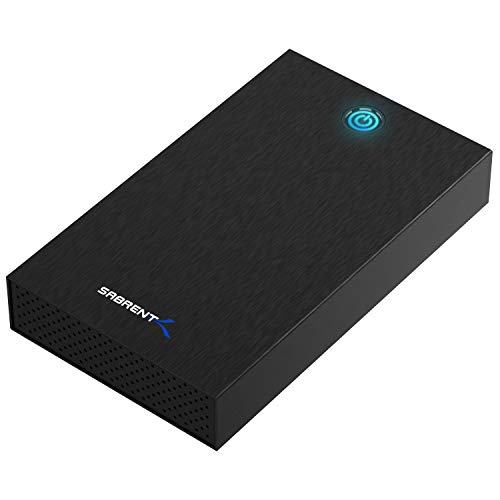
- Tool-free one-drive swap design
- Supports 2.5-inch and 3.5-inch SATA drives
- Includes external power and aluminum shell
Best For: People who want a simple one-bay SATA enclosure
10Gbps Enclosure with Hub
MAIWO 3.5/2.5 SATA 10Gbps Enclosure

- 10Gbps USB 3.1 Gen 2 with UASP
- Built-in hub ports for expansion
- Supports 2.5-inch and 3.5-inch SATA drives
Best For: Users who want a single-drive enclosure with extra USB ports
Large-Capacity 4-Bay Pick

- 4 bays for 2.5/3.5-inch SATA HDDs and SSDs
- USB 3.2 Gen 2 with up to 10Gbps support
- Tool-free, hot-swappable DAS design
Best For: Desktop users who need high-capacity, easy-access storage
Single-Drive Budget Choice

- USB 3.1 Gen2x1 Type-C with 10Gbps theoretical speed
- Works with 2.5-inch and 3.5-inch SATA HDDs/SSDs
- Includes 12V/2A power adapter and power switch
Best For: Single-drive users who want a simple powered USB-C enclosure
High-Capacity 6-Bay Expansion

- Six bays for 2.5/3.5-inch SATA HDDs and SSDs
- USB 3.2 Gen 2 with up to 10Gbps support
- Dual fans and hot-swappable drive support
Best For: Large desktop storage setups that need six-drive expansion
Compact SATA Pick – Cable Matters 2.5" 10Gbps USB-C Enclosure
If you want a hard drive enclosure with 10gbps usb for a single 2.5-inch SATA drive, this Cable Matters model keeps things simple and portable. Its aluminum shell is built to help with heat dissipation, while USB-C support makes it a practical match for modern laptops and Thunderbolt 3 systems.
Best For: Portable 2.5-inch SATA SSD or HDD use, especially for Windows and Mac users who want fast, tool-free storage expansion.
Pros:
- Up to 10Gbps transfer speed with compatible computers
- Supports 2.5-inch SATA SSDs and HDDs up to 9.5mm
- Tool-free design makes drive swaps quick and easy
- Aluminum housing helps protect the drive and manage heat
Cons:
- Designed for one drive only
- Only supports 2.5-inch SATA drives, not 3.5-inch drives
- Top speed depends on a compatible USB-C/Thunderbolt setup
This is a straightforward pick if your goal is fast external storage without extra complexity. The included UASP, TRIM, and S.M.A.R.T. support can be useful on compatible systems, and the low-profile build suits everyday backup and repair tasks.
Dual-Bay RAID Pick – TERRAMASTER D2-320 2-Bay 10Gbps RAID Enclosure
For shoppers who need a hard drive enclosure with 10gbps usb and more than one drive bay, the TERRAMASTER D2-320 is built as a direct-attached storage unit rather than a NAS. It supports multiple RAID modes and can handle both 3.5-inch and 2.5-inch SATA drives, making it a flexible desktop storage box for backups and higher-capacity storage.
Best For: Users who want a two-bay RAID enclosure for flexible storage, mirror backups, or speed-focused RAID 0 setups.
Pros:
- USB 3.2 Gen 2 with up to 10Gbps transfer speed
- Supports RAID 0, RAID 1, JBOD, and Single modes
- Fits both 3.5-inch and 2.5-inch SATA HDDs and SSDs
- Includes intelligent temperature-controlled fan and tool-free trays
Cons:
- Diskless enclosure, so drives must be purchased separately
- Larger and heavier than a single-drive enclosure
- Designed for desktop use rather than portability
This enclosure makes the most sense when storage flexibility matters more than compact size. If you want RAID options, high-capacity drive support, and easier drive management in one box, the D2-320 covers those needs well.
Heavy-Duty Desktop Pick – ACASIS Aluminum 3.5/2.5 SATA Desktop Enclosure
If your priority is a sturdy hard drive enclosure with 10gbps usb keywords in mind but your drive needs are more about dependable desktop storage than peak interface speed, this ACASIS enclosure is worth a look. It supports 2.5-inch and 3.5-inch SATA drives, uses an aluminum shell for heat management, and adds an independent power switch for easier daily use.
Best For: Desktop backups and larger SATA drives when you want an aluminum enclosure with simple power control and strong cooling.
Pros:
- Supports 2.5-inch and 3.5-inch SATA SSD/HDD drives
- Aluminum shell and open-frame tray help with heat dissipation
- Independent switch simplifies everyday operation
- 10-minute smart sleep mode helps reduce power use
Cons:
- Listed transfer speed is 6Gbps, not 10Gbps
- Bulkier desktop design than a portable enclosure
- Best suited to SATA drives only
This model stands out for its practical build rather than raw interface speed. If you want a well-ventilated enclosure for a larger SATA drive and value easy power control, it offers a straightforward, no-fuss setup.
Quiet Desktop Pick – Avolusion PRO-G2 3.5-Inch 10Gbps USB-C Enclosure
The Avolusion PRO-G2 is a practical hard drive enclosure with 10gbps usb support for turning a 3.5-inch SATA hard drive into external storage. It is designed for Windows and macOS, ships diskless, and uses a fan-less design, so it fits better in quiet office or home setups where low noise matters.
Best For: Users who want a quiet desktop enclosure for a single 3.5-inch SATA drive and easy plug-and-play backup storage.
Pros:
- USB 3.2 Gen 2 interface supports up to 10Gbps
- Converts a 3.5-inch SATA HDD into external USB-C storage
- Fan-less design keeps operation quiet
- Compatible with Windows and macOS with no driver setup
Cons:
- Internal HDD is not included
- Supports 3.5-inch drives, so it is not the most compact option
- Designed for desktop use rather than travel
For a simple drive enclosure that focuses on silence and straightforward setup, the PRO-G2 is easy to understand and easy to use. It is especially appealing if you already have a spare 3.5-inch SATA drive and want dependable external backup storage.
4-Bay 10Gbps Dock – WAVLINK 4-Bay 10Gbps USB-C Enclosure
If you want a hard drive enclosure with 10gbps usb that does more than just hold disks, this WAVLINK 4-bay model is aimed at heavy storage expansion and desktop docking. It supports up to four 3.5-inch or 2.5-inch SATA drives, uses a 10Gbps USB-C 3.2 connection, and adds HDMI plus a second USB-C port for extra flexibility.
Best For: Users who need a high-capacity multi-bay enclosure with cooling, hot-swappable drive bays, and display/output options in one unit.
Pros:
- Four SATA bays with support for 3.5-inch and 2.5-inch drives
- 10Gbps USB-C interface for fast file transfers
- Built-in temperature-controlled dual fans and aluminum shell
- Independent on/off switches for each bay and HDMI 4K output support
Cons:
- 2.5-inch drives need separate 2.5-inch to 3.5-inch mounting brackets, which are not included
- HDMI output requires a host USB-C port with video output support and the USB-C to C cable
- Larger and more complex than a simple single-bay enclosure
This is a strong pick if your priority is scalable storage plus workstation-style connectivity. It makes the most sense when you want capacity, cooling, and convenience in one enclosure rather than a basic drive dock.
Tool-Free Single-Bay Dock – SABRENT USB 3.0 SATA Enclosure
The SABRENT EC-KSL3 is a straightforward choice if you do not need a hard drive enclosure with 10gbps usb and prefer a simpler USB 3.0 SATA dock for one drive. It supports 2.5-inch and 3.5-inch SATA HDDs and SSDs, uses a USB-A connection, and focuses on easy drive swapping with included external power.
Best For: Users who want a simple, tool-free SATA enclosure for one drive and do not need USB-C or 10Gbps speeds.
Pros:
- Tool-free design makes drive swaps quick and easy
- Supports both 2.5-inch and 3.5-inch SATA HDDs and SSDs
- Includes 12V/2A power adapter for stable operation
- Aluminum shell with ABS tray for durability and heat dissipation
Cons:
- USB 3.0 Type-A only, so USB-C users may need an adapter
- Not compatible with SAS, M.2, NVMe, or IDE/PATA drives
- Single-bay design limits it to one drive at a time
This enclosure is best viewed as a practical everyday SATA solution rather than a speed-focused upgrade. It is ideal when simplicity, compatibility with standard SATA drives, and tool-free access matter more than maximum interface speed.
10Gbps Enclosure with Hub – MAIWO 3.5/2.5 SATA 10Gbps Enclosure
If you want a hard drive enclosure with 10gbps usb plus extra expansion, the MAIWO model is built around a USB 3.1 Gen 2 connection and integrated hub ports. It supports 2.5-inch and 3.5-inch SATA HDDs and SSDs, offers up to 24TB capacity, and adds two Type-A hub ports plus one Type-C hub port for more connectivity.
Best For: Users who want a single-drive enclosure with 10Gbps connectivity and built-in USB hub expansion.
Pros:
- 10Gbps USB 3.1 Gen 2 interface with UASP support
- Supports both 2.5-inch and 3.5-inch SATA drives up to 24TB
- Includes two Type-A hub ports and one Type-C hub port
- Stackable design with daisy-chain support and external 12V/3A power
Cons:
- Single-bay design only supports one drive at a time
- 3.5-inch drive transfer speed is noted as up to 6Gbps under the stated conditions
- Requires external power, so it is not bus-powered
This is a good fit if you want one enclosure that handles storage and gives you extra USB ports at the same time. It stands out most for users who value desk-side flexibility and daisy-chain expansion over multi-bay capacity.
Large-Capacity 4-Bay Pick – CENMATE 4-Bay 10Gbps DAS
If you need a hard drive enclosure with 10gbps usb for a bigger desktop storage setup, this 4-bay CENMATE model is built for high-capacity SATA HDDs and SSDs with hot-swappable convenience. It focuses on fast USB 3.2 Gen 2 connectivity, broad compatibility, and a tool-free design, making it a practical DAS option for users who want easy multi-drive expansion without RAID or NAS complexity.
Best For: Users who want a 4-bay external storage enclosure for large desktop backups, mixed HDD/SSD use, and simple hot-swap access.
Pros:
- USB 3.2 Gen 2 interface with up to 10Gbps transfer support
- Supports 2.5-inch and 3.5-inch SATA HDDs/SSDs across four bays
- Tool-free, hot-swappable design for easier drive changes
- Aluminum body plus built-in fan for added cooling
Cons:
- Fan noise is noted at around 40-50 dB
- Sold as DAS only, with no RAID or NAS features
- Bulkier than single-drive enclosures
Overall, this enclosure makes the most sense if you want straightforward multi-drive storage and value capacity plus speed over advanced array management. Its design is aimed at users who need reliable expansion on a desk, not a quiet, minimalist setup.
Single-Drive Budget Choice – MAIWO 10Gbps USB-C Enclosure
This hard drive enclosure with 10gbps usb is a simple single-bay option for 2.5-inch and 3.5-inch SATA drives when you want USB-C convenience and stable everyday use. The MAIWO enclosure adds UASP support, an independent 12V/2A power adapter, and aluminum construction, so it fits users who need a straightforward external drive case rather than a multi-bay storage system.
Best For: People who want one reliable USB-C enclosure for a SATA HDD or SSD, including larger-capacity desktop drives.
Pros:
- USB 3.1 Gen2x1 Type-C interface with 10Gbps theoretical speed
- Supports 2.5-inch and 3.5-inch SATA HDDs and SSDs
- Includes a 12V/2A power adapter and power switch for stable operation
- Aluminum alloy shell with honeycomb design for better heat dissipation
Cons:
- Actual drive speed is limited by the SATA drive itself
- Single-bay design may not suit multi-drive expansion needs
- Only supports SATA drives, not IDE, U.2, or SAS
In practical terms, this is the easy pick if you want a basic USB-C enclosure that prioritizes compatibility and dependable power. It is best for one-drive setups where simplicity matters more than advanced expansion.
High-Capacity 6-Bay Expansion – CENMATE 6-Bay 10Gbps DAS
If you are shopping for a hard drive enclosure with 10gbps usb and need more room than a standard single-bay case, this 6-bay CENMATE enclosure is built for big desktop storage builds. It combines USB 3.2 Gen 2 connectivity, hot-swappable drive support, aluminum construction, and dual fans, making it a strong fit for users who want a high-capacity DAS with easy expansion.
Best For: Users who need six-drive storage for backups, media libraries, or small business desktop expansion.
Pros:
- USB 3.2 Gen 2 with up to 10Gbps transfer support
- Six-bay design supports 2.5-inch and 3.5-inch SATA HDDs/SSDs
- Hot-swappable setup for easier drive replacement
- Dual 2.7-inch fans plus aluminum body for cooling
Cons:
- Fan noise is listed at around 40-50 dB
- Sold as DAS only, with no RAID or NAS functionality
- Larger footprint than smaller enclosures
For users who want maximum bay count in a straightforward USB enclosure, this model offers a lot of storage flexibility. It is especially appealing when capacity and easy drive access matter more than quiet operation or compact size.
How We Picked the Best Hard Drive Enclosure with 10gbps USB
For this roundup, we prioritized real-world usefulness: 10Gbps USB 3.2 Gen 2 performance, broad SATA compatibility, stable thermal design, and straightforward setup. We also considered whether each Hard Drive Enclosure with 10gbps USB is better suited to a single drive, dual-drive backup, or higher-capacity multi-bay storage.
Quick Comparison
Single-bay models are best for portable SSDs or a spare 2.5-inch drive, while 2-bay and multi-bay enclosures are better for desktop backups, media libraries, and light NAS-style workflows. If you mainly want a fast external drive for everyday use, a compact aluminum enclosure is usually the easiest choice. If you need redundancy, expansion, or multiple disks in one box, look at the larger RAID and multi-bay designs.
Key Buying Factors for a Hard Drive Enclosure with 10gbps USB
Drive Size and Interface
Check whether the enclosure supports 2.5-inch SSDs, 3.5-inch HDDs, or both. SATA compatibility is standard, but not every model handles both form factors. Also confirm maximum capacity per bay if you plan to install large modern drives.
Cooling and Build Quality
Aluminum housings help move heat away from the drive, which matters more with HDDs and multi-drive setups. If you expect long transfer sessions or 24/7 use, a model with a fan or active cooling is worth considering.
Real-World Transfer Speed
10Gbps USB is fast enough to take advantage of SSDs and modern hard drives, but actual speed depends on the drive itself, the host port, and whether the enclosure supports UASP. For consistent results, use a proper USB-C or USB 3.2 Gen 2 port.
Power and Connectivity
3.5-inch drives usually need external power, while many 2.5-inch SSD/HDD enclosures run bus-powered. Make sure the enclosure matches your power and cable preferences, especially if you move it between laptops and desktops.
Who Should Buy Which Hard Drive Enclosure with 10gbps USB?
Choose a compact single-bay enclosure if you want a simple external SSD/HDD solution for backups, transfers, or portable storage. Pick a dual-bay option if you want more room for expansion or a basic mirrored setup. Go with a 4-bay or 6-bay enclosure if you need centralized storage for large media collections, project files, or multi-disk workflows and are willing to trade size for capacity and cooling.
For most buyers, the best Hard Drive Enclosure with 10gbps USB is the one that matches the drive size you already own, provides adequate cooling, and offers the connectivity you’ll actually use every day.